
For most photographers, the 2024 24-inch iMac with M4, 16GB memory, and 512GB SSD is the best overall choice, pairing a modern chip with more room for active files than the 256GB versions. The 256GB M4 iMac makes more sense for beginners who keep originals on external storage, while a 27-inch 5K iMac can suit editors who put screen size ahead of newer hardware. The main tradeoff is between a current, compact all-in-one and older renewed models with larger displays but less memory and aging components. Storage capacity, display workspace, and the condition of a renewed computer matter as much as the processor for a photo workflow. Read on for the full breakdown and guidance on choosing the right fit.

Turn the school run and nap time into listening time
- Thousands of audiobooks, podcasts and originals
- Listen on your phone, tablet or Echo — also offline
- Cancel anytime
Complete the kit


Key Takeaways
- The 512GB M4 configuration ranks first because it combines the newer M4 platform and 16GB memory with twice the built-in storage of the 256GB M4 options.
- All three 2024 M4 iMacs share the same core photo-editing appeal; the silver 512GB model stands out for capacity, while the silver and green 256GB models suit lighter, externally stored libraries.
- The renewed 27-inch 5K iMacs offer more screen area than the 24-inch models, but their listed 8GB memory and older Intel hardware make them less attractive for demanding or long-term workflows.
- The 2019 27-inch model’s 1TB Fusion Drive is not equivalent to an SSD; its capacity may help with local storage, but drive responsiveness and age are meaningful tradeoffs.
- The 21.5-inch 4K renewed iMac is the most constrained pick for detailed photo work, combining the smallest display here with 8GB memory and older hardware.
| Apple 2024 iMac All-in-One Desktop Computer with M4 Chip, 24-inch Retina Display, 16GB RAM, 512GB SSD, Silver | 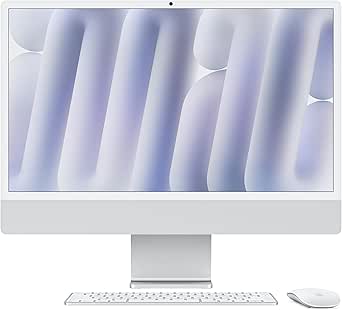 | Best Overall for Photographers | Display: 24-inch Retina 4.5K | Processor: Apple M4 chip with 10-core CPU and GPU | Memory: 16GB unified memory | VIEW ON AMAZON | See Our Full Breakdown |
| Apple 2024 iMac All-in-One Desktop Computer with M4 Chip, 24-inch Retina Display, 16GB RAM, 256GB SSD, Silver | 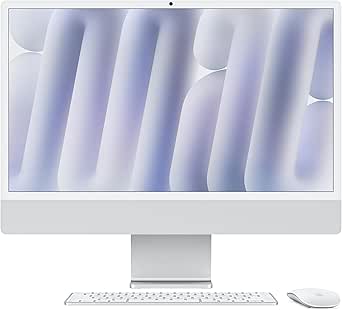 | Best for a Compact Modern Setup | Display: 24-inch Retina 4.5K | Processor: Apple M4 chip with 8-core CPU and 8-core GPU | Memory: 16GB unified memory | VIEW ON AMAZON | See Our Full Breakdown |
| Apple 27-inch 2019 iMac with Retina 5K Display, 3.0GHz Intel Core i5, 8GB RAM, 1TB Fusion Drive (Renewed) |  | Best for a Large Editing Canvas | Display: 27-inch Retina 5K, 5120 x 2880 | Processor: 3.0GHz 6-core Intel Core i5 | Graphics: Radeon Pro 570x, 575x, or 580x | VIEW ON AMAZON | See Our Full Breakdown |
| 2019 Apple iMac with Retina 4K Display (21.5-inch, 8GB RAM, 1TB Storage) (Renewed) |  | Best for Basic Photo Editing on a Tight Footprint | Display: 21.5-inch Retina 4K, 3840 x 2160 | Processor: 3GHz quad-core Intel Core i5 | Memory: 8GB DDR4 | VIEW ON AMAZON | See Our Full Breakdown |
| Apple iMac with Retina 5K Display (27-inch, 8GB RAM, 512GB SSD) |  | Best for a 27-inch 5K Display with SSD Storage | Display: 27-inch Retina 5K, 5120 x 2880 | Processor: 3.3GHz 6-core Intel Core i5 | Graphics: AMD Radeon Pro 5300 with 4GB GDDR5 | VIEW ON AMAZON | See Our Full Breakdown |
| Apple 2024 iMac All-in-One Desktop Computer with M4 Chip, 24-inch Retina Display, 16GB Memory, 256GB SSD, Green |  | Best for Apple-Integrated Editing | Display: 24-inch Retina 4.5K | Processor: Apple M4 chip with 8-core CPU and 8-core GPU | Memory: 16GB unified memory | VIEW ON AMAZON | See Our Full Breakdown |
| imac for photographer | Display | Processor | Memory | Storage |
|---|---|---|---|---|
| Apple 2024 iMac All-in-One Des | 24-inch Retina 4.5K | Apple M4 chip with 10-core CPU and GPU | 16GB unified memory | 512GB SSD |
| Apple 2024 iMac All-in-One Des | 24-inch Retina 4.5K | Apple M4 chip with 8-core CPU and 8-core GPU | 16GB unified memory | 256GB SSD |
| Apple 27-inch 2019 iMac with R | 27-inch Retina 5K, 5120 x 2880 | 3.0GHz 6-core Intel Core i5 | 8GB DDR4 | 1TB Fusion Drive |
| 2019 Apple iMac with Retina 4K | 21.5-inch Retina 4K, 3840 x 2160 | 3GHz quad-core Intel Core i5 | 8GB DDR4 | 1TB HDD |
| Apple iMac with Retina 5K Disp | 27-inch Retina 5K, 5120 x 2880 | 3.3GHz 6-core Intel Core i5 | 8GB DDR4 | 512GB SSD |
| Apple 2024 iMac All-in-One Des | 24-inch Retina 4.5K | Apple M4 chip with 8-core CPU and 8-core GPU | 16GB unified memory | 256GB SSD |
More Details on Our Top Picks
Apple 2024 iMac All-in-One Desktop Computer with M4 Chip, 24-inch Retina Display, 16GB RAM, 512GB SSD, Silver
I’d put this 2024 iMac first for photographers who want a current all-in-one system without assembling a separate display and computer. Its 24-inch 4.5K Retina screen supports a billion colors, giving photo edits clear detail and a broad color presentation, while the M4 chip with a 10-core CPU and GPU offers more headroom for editing work than the 8-core configuration in the 256GB M4 iMac. The included 512GB SSD also leaves more room for apps and active projects before external storage becomes necessary. That capacity is still modest for large photo libraries, and the memory and storage are not listed as upgradeable. I’d choose this over the older 27-inch models for newer connectivity and performance, but photographers who prioritize a larger editing canvas may prefer their 27-inch 5K displays.
Pros:- 24-inch 4.5K display supports a billion colors for detailed image viewing
- 10-core M4 CPU and GPU configuration offers more processing capability than the 8-core M4 option listed
- 512GB SSD provides twice the listed capacity of the 256GB M4 model
- Four Thunderbolt 4 ports and support for two 6K displays allow a more expandable desk setup
Cons:- The 24-inch screen is smaller than the 27-inch 5K displays in this roundup
- 512GB can fill quickly with RAW files and active photo projects
- Memory and storage upgradeability are not specified
Best for: Photographers who want a recent, ready-to-use Mac for editing and everyday work, with more built-in working storage than the 256GB M4 configuration.
Not ideal for: Photographers who need a 27-inch editing surface, extensive internal project storage, or room to upgrade memory and storage later.
- Display:24-inch Retina 4.5K
- Processor:Apple M4 chip with 10-core CPU and GPU
- Memory:16GB unified memory
- Storage:512GB SSD
- Ports:Four Thunderbolt 4 ports
- External display support:Up to two 6K displays
- Wireless:Wi-Fi 6E and Bluetooth 5.3
- Color:Silver
Our verdict“I’d choose this M4 iMac for photographers seeking the strongest mix of current performance, color-rich display, and included storage in a compact all-in-one.”
Apple 2024 iMac All-in-One Desktop Computer with M4 Chip, 24-inch Retina Display, 16GB RAM, 256GB SSD, Silver
This is the more space-conscious way into the current M4 iMac range, with a 24-inch 4.5K Retina display and 16GB unified memory in a 9.72-pound all-in-one. For photographers who keep projects on external drives or cloud storage, the M4 platform and color-capable screen make it a capable everyday editing desk without the footprint of the older 27-inch models. Compared with the 512GB M4 iMac, the main compromise is clear: 256GB SSD capacity leaves less room for a working catalog, exports, and applications. Its 8-core CPU and GPU configuration is also below the 10-core setup of that other M4 option. I’d pick this when compactness and a modern system matter more than onboard capacity; photographers who routinely work with large libraries should favor the 512GB model or plan external storage from the start.
Pros:- 24-inch 4.5K Retina display provides a high-resolution workspace in a compact all-in-one
- 16GB unified memory is more generous than the 8GB listed in the older Intel models
- M4 chip provides a current processor platform for compatible photo applications
- Wi-Fi 6E, Bluetooth 5.3, and Thunderbolt 4 support modern desk connectivity
Cons:- 256GB SSD is restrictive for sizable photo libraries and project files
- 8-core CPU and GPU configuration has fewer listed cores than the 512GB M4 model
- Smaller display area than the 27-inch 5K iMac options
Best for: Photographers with a small workspace who edit selected projects locally and store most originals on external or network drives.
Not ideal for: Photographers who want a large internal catalog, keep many active projects on the Mac, or need the higher-core M4 configuration.
- Display:24-inch Retina 4.5K
- Processor:Apple M4 chip with 8-core CPU and 8-core GPU
- Memory:16GB unified memory
- Storage:256GB SSD
- Ports:Up to four Thunderbolt 4 ports
- Wireless:Wi-Fi 6E and Bluetooth 5.3
- Dimensions:21.54 x 5.79 x 18.15 inches
- Weight:9.72 pounds
Our verdict“I’d choose this compact M4 iMac if a small footprint and current platform matter more than keeping a large photo library on the internal drive.”
Apple 27-inch 2019 iMac with Retina 5K Display, 3.0GHz Intel Core i5, 8GB RAM, 1TB Fusion Drive (Renewed)
The strongest reason to choose this renewed 2019 iMac is its 27-inch Retina 5K display: the extra screen area can make timelines, image previews, and editing panels easier to arrange than on either 24-inch M4 model. Its 1TB Fusion Drive offers more stated capacity than the 512GB SSD in the 2020 iMac, but it is a hybrid drive rather than an all-SSD setup, so storage responsiveness is a tradeoff. The 8GB RAM also trails the 16GB in both new M4 iMacs, which makes this a less comfortable choice for demanding current workflows. I’d consider it when display size matters most and a renewed Intel Mac fits the workflow; buyers who value newer processing and connectivity should look to the M4 options instead. Refurbished condition and the limited 90-day warranty add uncertainty.
Pros:- 27-inch Retina 5K display gives more editing space than either 24-inch M4 iMac
- 1TB Fusion Drive offers more listed capacity than the 512GB SSD in the 2020 iMac
- Six-core Intel Core i5 processor is specified for this configuration
- Thunderbolt 3 and USB-C connectivity support peripherals and external storage
Cons:- 8GB RAM is half the listed memory of the 2024 M4 iMac models
- Fusion Drive is not an SSD-only storage configuration
- Renewed condition may vary and the listed warranty is limited to 90 days
Best for: Photographers who prioritize a large 5K built-in display and want a roomy desktop workspace for editing.
Not ideal for: Photographers who need a newer processor, 16GB memory, SSD-only storage, or a longer stated warranty.
- Display:27-inch Retina 5K, 5120 x 2880
- Processor:3.0GHz 6-core Intel Core i5
- Graphics:Radeon Pro 570x, 575x, or 580x
- Memory:8GB DDR4
- Storage:1TB Fusion Drive
- Connectivity:Thunderbolt 3, USB-C, and 802.11ac Wi-Fi
- Weight:21 pounds
- Warranty:90-day limited warranty
Our verdict“I’d consider this renewed model for photographers who value a 27-inch 5K screen above newer hardware and accept its memory and storage compromises.”
2019 Apple iMac with Retina 4K Display (21.5-inch, 8GB RAM, 1TB Storage) (Renewed)
This renewed 2019 iMac suits a photographer who needs a basic desktop for sorting images, light edits, and general Mac tasks, rather than a machine built around demanding post-production. Its 21.5-inch Retina 4K display is sharp for the screen size, while the listed 1TB HDD provides more nominal capacity than the 256GB M4 iMac. That capacity comes with a major speed tradeoff: this is a hard drive, not the SSD storage in the newer models. The 8GB RAM and four-core Intel processor also leave less headroom than either 2024 M4 configuration. Compared with the 27-inch 2019 5K iMac, this model takes up less space but gives up screen area and resolution. I’d treat it as an entry-level renewed option, with its older software and 90-day warranty in mind.
Pros:- 21.5-inch Retina 4K display delivers detailed viewing in a smaller format than the 27-inch models
- Listed 1TB storage capacity exceeds the 256GB SSD in the entry M4 configuration
- Includes keyboard and mouse according to the supplied product information
- USB-C and Thunderbolt connectivity are listed for external devices
Cons:- 1TB HDD is slower than the SSD storage in the M4 and 2020 iMac options
- 8GB RAM and a four-core Intel processor offer limited headroom for heavier editing
- Renewed unit has a listed 90-day limited warranty and runs macOS Mojave
Best for: Casual photographers who organize images and make light edits at a compact desk, with files backed up elsewhere.
Not ideal for: Photographers handling large RAW batches, complex edits, or workflows that depend on fast local storage and newer software support.
- Display:21.5-inch Retina 4K, 3840 x 2160
- Processor:3GHz quad-core Intel Core i5
- Memory:8GB DDR4
- Storage:1TB HDD
- Graphics:Integrated graphics (GDDR5, as listed)
- Operating system:macOS Mojave
- Connectivity:Bluetooth, USB Type-C, Thunderbolt, and Wi-Fi
- Warranty:90-day limited warranty
Our verdict“I’d choose this renewed 4K iMac only for light editing and file organization when a smaller screen and older hardware are acceptable.”
Apple iMac with Retina 5K Display (27-inch, 8GB RAM, 512GB SSD)
This 2020 iMac makes a distinct case for photographers who want a 27-inch Retina 5K display and an SSD without moving to the smaller 24-inch screen of the M4 models. Its 512GB SSD avoids the Fusion Drive in the renewed 2019 27-inch iMac and the HDD in the renewed 21.5-inch model, giving projects and applications a faster storage foundation. The 3.3GHz six-core Intel Core i5 and Radeon Pro 5300 graphics are specified, but 8GB RAM is a weak point for heavier editing compared with the 16GB in either 2024 iMac. The larger display is its main advantage; the M4 models offer newer processors and more memory, while this older machine has more screen area. I’d favor it for a large-screen workflow, provided the memory limit fits the work.
Pros:- 27-inch Retina 5K display offers more workspace than the 24-inch M4 iMacs
- 512GB SSD provides faster storage than the Fusion Drive and HDD in the renewed alternatives
- Six-core Intel Core i5 and Radeon Pro 5300 graphics are specified
- Two Thunderbolt 3 ports and six USB ports provide a wide range of connections
Cons:- 8GB RAM is less than the 16GB included with the 2024 M4 models
- 512GB internal capacity may be limiting for photographers with large libraries
- Older Intel platform lacks the newer M4 chip and Wi-Fi 6E listed for the current iMacs
Best for: Photographers who want a large 5K built-in display and SSD storage for a desktop editing setup.
Not ideal for: Photographers who need 16GB memory out of the box, a newer processor platform, or more than 512GB of internal storage.
- Display:27-inch Retina 5K, 5120 x 2880
- Processor:3.3GHz 6-core Intel Core i5
- Graphics:AMD Radeon Pro 5300 with 4GB GDDR5
- Memory:8GB DDR4
- Storage:512GB SSD
- Ports:Two Thunderbolt 3 (USB-C), six USB, Ethernet, and audio out
- Wireless:802.11ac Wi-Fi and Bluetooth
- Warranty:1-year limited warranty
Our verdict“I’d pick this iMac for photographers who value a spacious 27-inch 5K display and SSD storage more than the newer platform and 16GB memory of the M4 models.”
Apple 2024 iMac All-in-One Desktop Computer with M4 Chip, 24-inch Retina Display, 16GB Memory, 256GB SSD, Green
This green M4 iMac suits photographers who want a capable editing station that also works smoothly with other Apple devices. Its 24-inch 4.5K Retina display gives photos plenty of detail on a compact desktop, while the 16GB unified memory and M4 chip offer a more current foundation for editing than the renewed 2019 iMac models in this roundup. Compared with the otherwise similar 2024 silver model with 256GB storage, the main distinction here is the colorful finish, not a photography-specific performance advantage.
The tradeoff is storage: a 256GB SSD can fill quickly with RAW files and catalogs, so an external drive or cloud workflow is likely for a growing library. Its integrated graphics also make it less suited to demanding GPU-heavy work than a dedicated graphics workstation. I’d choose it for everyday photo editing and Apple-device continuity, not as a high-capacity archive or specialist rendering machine.
Pros:- Detailed 24-inch 4.5K Retina display for reviewing and editing images
- M4 chip and 16GB unified memory provide a modern setup for everyday editing
- Works smoothly with other Apple devices
- Supports two external 6K displays for an expanded editing workspace
Cons:- 256GB SSD leaves limited room for large photo libraries and applications
- Integrated 8-core GPU is not a dedicated graphics option for GPU-intensive work
- The 24-inch built-in display offers less workspace than the 27-inch iMac options
Best for: Photographers who edit regularly, use other Apple devices, and prefer a compact all-in-one with a colorful finish and are comfortable storing photo libraries externally.
Not ideal for: Photographers with large local RAW archives or demanding GPU-heavy workflows who need substantial built-in storage or dedicated graphics.
- Display:24-inch Retina 4.5K
- Processor:Apple M4 chip with 8-core CPU and 8-core GPU
- Memory:16GB unified memory
- Storage:256GB SSD
- Connectivity:Wi-Fi 6E, Bluetooth 5.3, up to four Thunderbolt 4 ports
- External display support:Supports two external 6K displays
- Camera:12MP Center Stage
- Color:Green
Our verdict“Choose this iMac for a compact, Apple-connected photo-editing setup if you plan to keep large image libraries on external storage.”

How We Picked
I ranked these iMacs by how well their listed configurations support real photography tasks: editing high-resolution files, keeping several applications open, reviewing images on the built-in display, and managing a growing library. I gave the 2024 M4 models an advantage for their newer platform and 16GB memory, then separated them by SSD capacity because a 256GB drive can fill quickly when applications, previews, and active projects share space.
I also weighed screen size and storage type against the compromises of older renewed systems. The 27-inch 5K models offer more workspace than the 24-inch iMacs, but both list 8GB RAM, and one uses a Fusion Drive; the 21.5-inch 4K model has less screen area still. Renewed status adds uncertainty about condition and remaining service life, so those models rank below the current M4 configurations unless a buyer specifically prioritizes a larger built-in display or local drive capacity. These rankings reflect the configurations provided, not claims of hands-on testing.
| imac for photographer | Ports | Graphics | Connectivity |
|---|---|---|---|
| Apple 2024 iMac All-in-One Des | Four Thunderbolt 4 ports | — | — |
| Apple 2024 iMac All-in-One Des | Up to four Thunderbolt 4 ports | — | — |
| Apple 27-inch 2019 iMac with R | — | Radeon Pro 570x, 575x, or 580x | Thunderbolt 3, USB-C, and 802.11ac Wi-Fi |
| 2019 Apple iMac with Retina 4K | — | Integrated graphics (GDDR5, as listed) | Bluetooth, USB Type-C, Thunderbolt, and Wi-Fi |
| Apple iMac with Retina 5K Disp | Two Thunderbolt 3 (USB-C), six USB, Ethernet, and audio out | AMD Radeon Pro 5300 with 4GB GDDR5 | — |
| Apple 2024 iMac All-in-One Des | — | — | Wi-Fi 6E, Bluetooth 5.3, up to four Thunderbolt 4 ports |
Factors to Consider When Choosing Imac For Photographers
Choosing an iMac for photography is less about finding one universal winner and more about matching the computer to your file sizes, editing habits, and storage plan. I would settle the workflow questions first, then compare screen workspace, memory, and drive capacity rather than choosing by color or headline processor alone.
Match Memory to Your Editing Habits
Memory affects how comfortably an editing app can work alongside catalogs, browser tabs, and other creative tools. The M4 options here list 16GB memory, while every older model lists 8GB RAM, making the newer configurations a stronger starting point for multitasking. Large layered files and high-resolution edits can make memory limits more noticeable than simple image viewing. Before choosing an older iMac, check whether its memory can be upgraded; do not assume every configuration offers an easy path. A common mistake is focusing only on processor labels while overlooking the amount of memory that stays available during a busy session.
Treat the Display as Your Editing Workspace
A built-in display determines how much of an image and editing interface can fit on screen at once. The 27-inch 5K models offer more physical workspace than the 24-inch M4 iMacs, while the 21.5-inch 4K model is the tightest fit for side-by-side panels and detailed review. A larger screen can reduce interface crowding, but it does not by itself guarantee accurate color or a calibrated editing setup. If color-critical work matters, plan to check calibration and viewing conditions rather than treating resolution as a substitute for color management. Choose the screen size that fits your desk and workflow, not just the largest number in a listing.
Plan Storage Around Your Photo Library
A 256GB internal SSD can work for applications and current projects if originals live on external drives or network storage, but it leaves less room for catalogs, previews, and active exports. The 512GB M4 configuration offers more breathing room, while the renewed 27-inch Fusion Drive model lists 1TB of capacity with a different drive design. Capacity and responsiveness are separate questions: a Fusion Drive should not be treated as equivalent to an SSD simply because it holds more data. Many photographers get better control by keeping a working set on the computer and maintaining separate backups of original files. Count both your existing library and your backup plan before deciding how much built-in storage you need.
Weigh Newer Hardware Against a Larger Older Screen
The lineup presents a clear tradeoff: current M4 hardware and 16GB memory in a 24-inch all-in-one, or older Intel systems with larger 27-inch 5K displays. For a workflow built around current editing software and several applications at once, the newer platform is the safer fit from these listed specifications. An older 5K iMac can still appeal if screen area is your primary priority and your software needs are modest. Check software compatibility and support status before buying an older machine, since a capable display cannot make aging hardware current. Pay more attention to the work you do today and the support horizon you need than to the screen alone.
Inspect Renewed Models Before Committing
Renewed computers can offer a way to choose a larger display, but their condition and included support depend on the seller and listing. Verify the exact year, processor, storage type, memory configuration, return window, and warranty terms before purchase. Ask whether the display has visible defects and whether the computer has been checked for reliable operation; a product name alone cannot answer those questions. Factor in the possibility that an older unit may need service sooner than a current model. If predictable support and a longer useful life matter more than a 27-inch screen, the newer M4 choices are the less uncertain route.
Frequently Asked Questions
Is the 256GB M4 iMac enough for a photography workflow?
It can be enough if you keep your main photo library and backups on external storage and use the internal drive for applications and current projects. The limitation is how quickly previews, catalogs, exports, and other files can consume the remaining space. If you want several active projects on the computer at once, the 512GB M4 configuration gives you more room before storage management becomes part of the routine. An external drive can expand capacity, but it adds another item to connect and back up. Choose 256GB when your storage plan is already clear, not on the assumption that photo files will stay small.
Should I choose an older 27-inch 5K iMac over a 24-inch M4 model?
Choose the older 27-inch model only if the extra screen workspace is a higher priority than newer hardware and the listed 8GB memory is adequate for your workload. The M4 iMacs have 16GB memory and a newer platform, which makes them a better fit for heavier multitasking based on the configurations in this roundup. The 2019 models also differ in storage: one lists a Fusion Drive, while another lists an SSD, so confirm the exact specification rather than assuming they are alike. Since both are renewed listings, check condition, return terms, and software compatibility carefully. For a longer-term editing computer, I would lean toward the M4 unless the larger 5K display is a deciding need.
Is the 2019 27-inch iMac’s 1TB Fusion Drive a good choice for photo storage?
The listed 1TB capacity can hold more local files than the 256GB M4 options, but a Fusion Drive is not the same storage type as an SSD. That difference matters when opening catalogs, browsing files, or moving active projects, so capacity alone should not settle the choice. This model also lists 8GB RAM and is a renewed 2019 computer, adding memory and age tradeoffs to the decision. It may suit a buyer who values a larger 5K display and wants local capacity for a modest workflow. For a responsive setup, consider external SSD storage and keep a separate backup regardless of the internal drive.
Which iMac in this roundup makes the most sense for a first-time photo editor?
The 256GB M4 iMac is a sensible beginner option if the photographer is comfortable storing originals externally. Its 16GB memory and newer M4 platform give a more capable starting point than the renewed 8GB models, while the smaller SSD keeps the configuration focused on essential work. Beginners with an existing library or no external drive should look closely at the 512GB M4 version instead, since storage pressure can arrive early. The green and silver 256GB models share the listed core configuration, so color can be a personal preference rather than a performance distinction. I would avoid choosing an older 8GB model solely for a larger screen without checking app needs and upgrade options.
Does the green 256GB M4 iMac perform differently from the silver 256GB model?
The provided specifications list the same M4 chip, 24-inch Retina display, 16GB memory, and 256GB SSD for both colors. On those details, color does not create a photography-workflow advantage, so the choice comes down to appearance and the exact seller listing. Neither version solves the limited internal capacity, which may matter more than finish once you begin storing catalogs and active projects. Confirm that the complete configuration and included accessories match the listing before ordering. If storage headroom matters, compare either 256GB model with the 512GB silver configuration rather than treating color as the deciding factor.
Conclusion
My best overall pick is the 2024 24-inch M4 iMac with 16GB memory and a 512GB SSD: it balances current hardware with the most useful built-in SSD capacity among the M4 options. For best value and beginners, I would choose a 256GB M4 model when external storage is part of the plan; the green and silver versions share the listed core specifications. The best premium fit within this lineup is still the 512GB M4 configuration for photographers who want more internal room, rather than an older renewed model with a larger screen. For a specific need—more workspace—the renewed 27-inch 5K iMacs are the screen-first alternatives, with the SSD-equipped listing preferable to the Fusion Drive model if drive type is a priority. I would pick the 21.5-inch 4K renewed iMac only for a constrained, modest workflow, since its 8GB memory and smaller display make it the least flexible choice here.