For most families, I’d start with the HelloBaby HB6550Plus, which pairs a large screen with remote camera movement and a no-Wi-Fi connection. The GoodBaby Split-Screen Monitor is a stronger fit for watching two rooms at once, while the Momcozy BM04 stands out for families who want Wi-Fi access and a 1080p camera. The main choice is between a simpler local connection and the flexibility of app-based viewing, followed by deciding whether you need one camera or two. Screen size, camera movement, and how the monitor handles multiple rooms also separate these models. Read on for the full breakdown and help matching a monitor to your home.

Turn the school run and nap time into listening time
- Thousands of audiobooks, podcasts and originals
- Listen on your phone, tablet or Echo — also offline
- Cancel anytime
Complete the kit


Key Takeaways
- The shortlist splits by connection: most models here use a dedicated parent unit without Wi-Fi, while the Momcozy BM04 adds app-based Wi-Fi viewing.
- Two-camera models are not interchangeable: split-screen viewing, camera switching, and camera movement affect how easily you can watch siblings at once.
- Screen size changes the viewing experience: the 6-inch HelloBaby options give more room for video than the 2.8-inch VTech VM819 or 4.3-inch HelloBaby model.
- Remote pan and tilt are more useful across a large crib area: fixed or less adjustable cameras can suit a stable setup, but they offer less control from the parent unit.
- Several HelloBaby models share similar naming: compare the exact camera count, screen size, and movement features before choosing between HB6550, HB6550-2, HB6560, and HB6560-2.
| GoodBaby 5-Inch Split-Screen Baby Monitor with Two Cameras |  | Best for Split-Screen Monitoring | Display: 5-inch LCD | Included cameras: 2 | Maximum camera support: 4 cameras | VIEW LATEST PRICE | See Our Full Breakdown |
| Momcozy BM04 Smart WiFi Baby Monitor with 5-Inch 1080p Camera and Wall Mount |  | Best for Remote App Access | Parent unit display: 5 inches | Camera resolution: 1080p | Connectivity: Dedicated parent unit or 2.4GHz Wi-Fi | VIEW LATEST PRICE | See Our Full Breakdown |
| HelloBaby HB6550Plus 6-Inch No-WiFi Video Baby Monitor with Remote Pan-Tilt Camera |  | Best for a Large No-Wi-Fi Screen | Display: 6-inch IPS screen; one specification lists 5.5 inches | Wireless technology: Encrypted 2.4GHz FHSS | Wi-Fi required: No | VIEW LATEST PRICE | See Our Full Breakdown |
| VTimes Non-WiFi Baby Monitor with Camera and Audio | 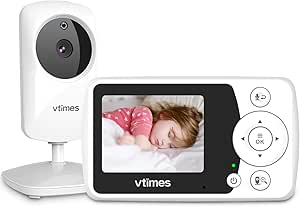 | Best Compact No-Wi-Fi Pick | Screen: 2.4-inch LCD | Video resolution: 480p | Connection: Encrypted, non-Wi-Fi 2.4GHz FHSS | VIEW LATEST PRICE | See Our Full Breakdown |
| HelloBaby HB6550 No-WiFi Baby Monitor with Two Cameras and 5-Inch Screen |  | Best for Two-Room Coverage Without Wi-Fi | Screen: 5-inch IPS | Cameras included: 2 | Maximum camera capacity: 4 cameras | VIEW LATEST PRICE | See Our Full Breakdown |
| VTech VM819 Video Baby Monitor with 2.8-Inch Screen |  | Best for Simple, Private Monitoring | Display: 2.8-inch LCD | Video resolution: 480p | Connection: 2.4GHz FHSS | VIEW LATEST PRICE | See Our Full Breakdown |
| HelloBaby HB6550 No-WiFi Baby Monitor with Camera and 5-Inch Video Screen |  | Best for One-Room Camera Control | Display: 5-inch color screen | Connection: 2.4GHz FHSS; no Wi-Fi required | Camera movement: 355° pan and 120° tilt | VIEW LATEST PRICE | See Our Full Breakdown |
| HelloBaby HB6550-2 5-Inch No-WiFi Baby Monitor with Two Pan-Tilt-Zoom Cameras |  | Best for Two-Room Monitoring | Display: 5-inch IPS | Included cameras: 2 pre-paired cameras | Camera movement: 355° pan and 120° tilt | VIEW LATEST PRICE | See Our Full Breakdown |
| HelloBaby HB6560 6-Inch No-WiFi Video Baby Monitor with Camera and Audio | 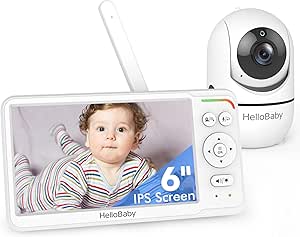 | Best for a Large Screen and Split View | Display: 6-inch IPS | Connection: Encrypted 2.4GHz FHSS; no Wi-Fi | Camera movement: 355° pan and 120° tilt | VIEW LATEST PRICE | See Our Full Breakdown |
| HelloBaby 4.3-Inch No-WiFi Video Baby Monitor with Pan-Tilt-Zoom |  | Best for Battery-Saving Flexibility | Display: 4.3-inch IPS | Connection: 2.4GHz FHSS; no Wi-Fi required | Camera movement: 350° pan and 120° tilt | VIEW LATEST PRICE | See Our Full Breakdown |
| HelloBaby HB6560-2 Baby Monitor with 2 Cameras and 6-Inch Split-Screen Display | 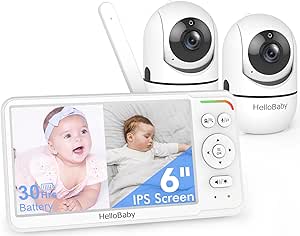 | Best for Monitoring Two Rooms | Display: 6-inch IPS screen | Cameras: 2 | Connection: 2.4 GHz FHSS; no Wi-Fi required | VIEW LATEST PRICE | See Our Full Breakdown |
| AnKeKe ABM570 No-WiFi Baby Monitor with Camera and 5-Inch Screen |  | Best for Zoom and Everyday Alerts | Display: 5-inch 720p IPS LCD | Connection: 2.4 GHz FHSS; no Wi-Fi, app, or cloud service | Battery: 3500mAh; up to 100 hours standby | VIEW LATEST PRICE | See Our Full Breakdown |
| Anicebb ABM570 5-Inch HD Video Baby Monitor with Remote Pan-Tilt-Zoom |  | Best for Flexible Camera Mounting | Display: 5-inch, 720p | Connection: 2.4 GHz FHSS; no Wi-Fi | Wireless range: Up to 1,000 feet | VIEW LATEST PRICE | See Our Full Breakdown |
| GoodBaby 5-Inch Baby Monitor with Camera and Audio, No Wi-Fi |  | Best for Simple No-Wi-Fi Monitoring | Display: 5-inch IPS LCD | Video resolution: 480p | Connection: 2.4 GHz FHSS; no Wi-Fi required | VIEW LATEST PRICE | See Our Full Breakdown |
| baby monitors with camera | Display | Camera movement | Battery life | Connection |
|---|---|---|---|---|
| GoodBaby 5-Inch Split-Screen B | 5-inch LCD | 355° pan and 120° tilt | Up to 30 hours in VOX mode; up to 10 hours with screen on | — |
| Momcozy BM04 Smart WiFi Baby M | — | — | — | — |
| HelloBaby HB6550Plus 6-Inch No | 6-inch IPS screen; one specification lists 5.5 inches | 355° pan and 120° tilt | 18–33 hours | — |
| VTimes Non-WiFi Baby Monitor w | — | — | — | Encrypted, non-Wi-Fi 2.4GHz FHSS |
| HelloBaby HB6550 No-WiFi Baby | — | 355° pan and 120° tilt | Up to 30 hours in ECO mode | — |
| VTech VM819 Video Baby Monitor | 2.8-inch LCD | — | Up to 19 hours video; up to 29 hours audio-only | 2.4GHz FHSS |
| HelloBaby HB6550 No-WiFi Baby | 5-inch color screen | 355° pan and 120° tilt | Up to 30 hours | 2.4GHz FHSS; no Wi-Fi required |
| HelloBaby HB6550-2 5-Inch No-W | 5-inch IPS | 355° pan and 120° tilt | Up to 30 hours in ECO mode | 2.4GHz FHSS; no Wi-Fi or internet required |
| HelloBaby HB6560 6-Inch No-WiF | 6-inch IPS | 355° pan and 120° tilt | 16–30 hours | Encrypted 2.4GHz FHSS; no Wi-Fi |
| HelloBaby 4.3-Inch No-WiFi Vid | 4.3-inch IPS | 350° pan and 120° tilt | Up to 30 hours in ECO mode; up to 16 hours in non-ECO mode | 2.4GHz FHSS; no Wi-Fi required |
| HelloBaby HB6560-2 Baby Monito | 6-inch IPS screen | 355° pan and 120° tilt | Up to 30 hours in VOX/ECO mode | 2.4 GHz FHSS; no Wi-Fi required |
| AnKeKe ABM570 No-WiFi Baby Mon | 5-inch 720p IPS LCD | 355° pan and 95° tilt | — | 2.4 GHz FHSS; no Wi-Fi, app, or cloud service |
| Anicebb ABM570 5-Inch HD Video | 5-inch, 720p | 355° pan and 95° tilt | Up to 100 hours in VOX mode | 2.4 GHz FHSS; no Wi-Fi |
| GoodBaby 5-Inch Baby Monitor w | 5-inch IPS LCD | 355° pan and 120° tilt | Up to 30 hours in VOX mode; up to 10 hours with screen on | 2.4 GHz FHSS; no Wi-Fi required |
More Details on Our Top Picks
GoodBaby 5-Inch Split-Screen Baby Monitor with Two Cameras
The split-screen display is the main reason I’d choose this GoodBaby: both included cameras remain visible at once, which is more useful for checking two children than the HelloBaby HB6550, which switches between camera views. It can also grow to four cameras, while remote pan, tilt, and zoom let me adjust a view from the parent unit rather than repositioning the camera by hand. VOX mode can extend stated battery life to 30 hours by waking the screen for sound, and infrared night vision, temperature alerts, and two-way audio cover everyday nursery checks. The tradeoffs are that audio scan alternates between cameras instead of monitoring both at once, and the listed range conflicts between 960 and 1,000 feet. The cameras are indoor-only and not water resistant.
Pros:- Shows two camera feeds simultaneously and supports up to four cameras.
- Remote pan, tilt, and zoom allow view adjustments from the parent unit.
- VOX mode, two-way audio, and eight lullabies provide flexible monitoring features.
- Infrared night vision and temperature alerts support routine nursery checks.
Cons:- Audio scan alternates between cameras every 15 seconds rather than monitoring both feeds at once.
- Product information lists conflicting maximum ranges of 960 and 1,000 feet.
- Cameras are for indoor use and are not water resistant.
Best for: Parents monitoring two rooms or children who want both camera feeds visible together and may add cameras later.
Not ideal for: Families who need simultaneous audio from multiple rooms, outdoor camera placement, or a single consistent range specification.
- Display:5-inch LCD
- Included cameras:2
- Maximum camera support:4 cameras
- Camera movement:355° pan and 120° tilt
- Zoom:2×
- Video resolution:480p and 720p
- Battery life:Up to 30 hours in VOX mode; up to 10 hours with screen on
- Additional features:Infrared night vision, two-way audio, temperature alerts, and 8 lullabies
Our verdict“Choose this GoodBaby if seeing two camera feeds at once matters more than simultaneous multi-room audio or a clearly stated range.”
Momcozy BM04 Smart WiFi Baby Monitor with 5-Inch 1080p Camera and Wall Mount
I’d pick the Momcozy BM04 for families who want to check the camera away from home, not just from a nearby parent unit. Its 1080p camera works with a dedicated 5-inch screen or the app over 2.4GHz Wi-Fi, and app tools add motion and safe-zone alerts, recording, and sharing with up to 20 family members. That gives it a different role from the no-Wi-Fi HelloBaby HB6550Plus, which avoids app and network setup but is tied to its local monitor. Remote access and recording bring useful flexibility, though this model depends on a compatible 2.4GHz network, and motion alerts appear only in the app. Placement also matters: the guidance calls for mounting at least 24 inches above the baby and no more than 16 feet horizontally from the crib, which can limit where the camera works well.
Pros:- Offers both a dedicated 5-inch parent unit and remote app access.
- 1080p camera resolution provides more image detail than the 480p VTimes monitor.
- App includes motion and safe-zone alerts, recording, and photo or video capture.
- Video access can be shared with up to 20 family members.
Cons:- Wi-Fi pairing supports 2.4GHz networks only.
- Motion alerts appear only in the app, not as a feature of the dedicated parent unit.
- Recommended camera distances can restrict placement, and image clarity and night vision depend on positioning.
Best for: Parents who want a dedicated screen at home plus app access, recordings, and shared viewing for family members.
Not ideal for: Households seeking a monitor that works without Wi-Fi, or families whose router supports only 5GHz Wi-Fi.
- Parent unit display:5 inches
- Camera resolution:1080p
- Connectivity:Dedicated parent unit or 2.4GHz Wi-Fi
- App features:Motion and safe-zone alerts, recording, photo capture, and video sharing
- Video sharing:Up to 20 family members
- Recommended mounting height:At least 0.6 m (24 in) above the baby
- Recommended horizontal distance:Up to 5 m (16 ft) from the crib
Our verdict“Choose the BM04 if remote app viewing and recording are priorities and your home has a compatible 2.4GHz Wi-Fi network.”
HelloBaby HB6550Plus 6-Inch No-WiFi Video Baby Monitor with Remote Pan-Tilt Camera
The 6-inch IPS screen makes the HB6550Plus a strong fit for parents who want a larger local view without connecting a camera to home Wi-Fi. Its encrypted 2.4GHz FHSS connection works without an app, while remote pan and tilt help cover more of the room from one camera. Compared with the two-camera HelloBaby HB6550, this model includes only one camera and supports expansion to two, so it gives up multi-camera flexibility in exchange for a larger display. The feature set is well suited to routine nursery checks: infrared night vision, two-way audio, temperature alerts, lullabies, and sound-level indicators are included. Audio-only power-saving mode can reduce screen use, but listed battery life varies from 18 to 33 hours, and product details conflict on whether the screen is 5.5 or 6 inches.
Pros:- Large IPS display is described as viewable from different angles.
- Encrypted FHSS connection requires neither Wi-Fi nor an app.
- Remote 355° pan and 120° tilt help adjust the camera view from the parent unit.
- Includes temperature alerts, two-way audio, lullabies, and audio-only power-saving mode.
Cons:- Only one camera is included, with expansion limited to two cameras.
- Product information conflicts between a 6-inch and 5.5-inch screen.
- Stated battery life spans 18 to 33 hours, leaving a broad range for buyers to account for.
Best for: Parents who prefer a large dedicated screen and a private, no-Wi-Fi connection for monitoring one room.
Not ideal for: Families who need two cameras included, more than two camera feeds, or consistent product information on screen size and battery life.
- Display:6-inch IPS screen; one specification lists 5.5 inches
- Wireless technology:Encrypted 2.4GHz FHSS
- Wi-Fi required:No
- Camera movement:355° pan and 120° tilt
- Expandable cameras:Up to 2 cameras
- Battery life:18–33 hours
- Additional features:Infrared night vision, two-way audio, temperature alerts, 8 lullabies, and sound-level indicator
- Mounting:Tabletop or wall mount
Our verdict“Choose the HB6550Plus if a larger no-Wi-Fi screen matters more than having two cameras included or room to expand beyond two.”
VTimes Non-WiFi Baby Monitor with Camera and Audio
The VTimes is the compact, straightforward choice here: its 2.4-inch screen and encrypted FHSS link pair a camera with a dedicated monitor, without Wi-Fi or app setup. That simplicity contrasts with the Momcozy BM04, which offers remote app access and recording but depends on a home network. VTimes instead keeps the feature set focused on local viewing, with two-way audio, automatic infrared night vision, and ECO mode that wakes the screen when it detects sound. Its bracket supports several placement options, which can help when a standard tabletop position is inconvenient. The small screen and 480p video are clear tradeoffs against larger-screen options such as the HelloBaby HB6550Plus, and the connection requires the included monitor. I’d skip it if app access, higher video resolution, or a large viewing area is a priority.
Pros:- Encrypted 2.4GHz FHSS connection works without Wi-Fi or an app.
- ECO mode wakes the display when sound is detected to help conserve battery.
- Automatic infrared night vision and two-way audio cover basic day-and-night checks.
- Camera can stand freely or be mounted with the supplied placement options.
Cons:- The 2.4-inch screen is much smaller than the 5-inch and 6-inch displays in this lineup.
- 480p video offers less detail than the Momcozy BM04’s 1080p camera.
- Monitoring depends on the included parent unit, with no Wi-Fi-based remote access.
Best for: Parents who want a simple, portable monitor for one room and prefer a local connection without Wi-Fi or app pairing.
Not ideal for: Caregivers who want app access, sharper-than-480p video, or a large screen for checking fine visual details.
- Screen:2.4-inch LCD
- Video resolution:480p
- Connection:Encrypted, non-Wi-Fi 2.4GHz FHSS
- Two-way audio:Yes
- Night vision:Automatic infrared
- Zoom:2× digital
- Camera placement:Free-standing or mountable with bracket
Our verdict“Choose VTimes for a compact, no-Wi-Fi setup if you can accept a small screen and basic 480p video.”
HelloBaby HB6550 No-WiFi Baby Monitor with Two Cameras and 5-Inch Screen
For parents who need to monitor two spaces without adding Wi-Fi cameras, the HelloBaby HB6550 stands out by including two remotely controlled cameras and supporting up to four. Its private 2.4GHz FHSS connection avoids app setup, while pan, tilt, and zoom help adjust each camera from the parent unit. Compared with the GoodBaby split-screen model, the HB6550 shows one camera at a time, so checking both rooms means switching views rather than watching them simultaneously. The 5-inch IPS display, two-way audio, infrared night vision, and temperature alerts make it a capable local monitor; VOX mode can provide up to 30 hours in ECO mode by waking the screen for sound. The stated 1,000-foot range is for outdoor use and depends on extending the antenna, so I wouldn’t treat it as an indoor-range guarantee.
Pros:- Includes two cameras and supports expansion to four.
- Private FHSS connection works without Wi-Fi or an app.
- Remote pan, tilt, and zoom help adjust the camera view from the parent unit.
- VOX/ECO mode offers up to 30 hours of battery life and wakes the display for sound.
Cons:- Displays one camera at a time rather than offering the GoodBaby’s split-screen view.
- The stated 1,000-foot range is outdoors and calls for an extended antenna.
- Cameras are not water resistant.
Best for: Families who want two remotely adjustable cameras and the option to add more, but prefer to monitor locally without Wi-Fi.
Not ideal for: Parents who need both camera feeds visible at once, app access away from home, or a monitor suited to outdoor camera placement.
- Screen:5-inch IPS
- Cameras included:2
- Maximum camera capacity:4 cameras
- Wireless technology:2.4GHz FHSS
- Camera movement:355° pan and 120° tilt
- Maximum range:Up to 1,000 ft outdoors; antenna extension recommended
- Battery life:Up to 30 hours in ECO mode
- Additional features:Infrared night vision, two-way audio, temperature alerts, VOX, and 8 lullabies
Our verdict“Choose the HB6550 if you want two included cameras and local monitoring, but choose the GoodBaby if simultaneous split-screen viewing matters more.”
VTech VM819 Video Baby Monitor with 2.8-Inch Screen
The VTech VM819 is the most straightforward pick here for parents who want a camera feed without Wi-Fi, an app, or account setup. Its encrypted 2.4GHz FHSS connection links the camera directly to the parent unit, while sound-activated viewing can keep the screen dark until the nursery gets noisy. Infrared night vision, two-way talk, and a temperature sensor cover common monitoring needs without adding much complexity. Compared with the HelloBaby HB6550, the VM819 is easier to choose if you prefer a compact, simple unit, but its 2.8-inch display is much smaller than that model’s 5-inch screen. The tradeoff is clear: you get a direct, app-free setup and up to 19 hours of video battery life, but less room to see fine detail at a glance.
Pros:- Encrypted direct connection works without Wi-Fi, internet, or an app.
- Sound-activated viewing can reduce screen use during quiet periods.
- Infrared night vision and 2x digital zoom aid low-light viewing.
- Two-way talk, soothing sounds, and a temperature sensor are built in.
Cons:- The 2.8-inch display is substantially smaller than the HelloBaby HB6550’s 5-inch screen.
- The camera is intended for indoor use and is not water resistant.
Best for: Parents who want a simple, app-free camera monitor for one indoor nursery and value a direct private connection.
Not ideal for: Caregivers who want a large display, camera pan and tilt, or coverage across multiple rooms.
- Display:2.8-inch LCD
- Video resolution:480p
- Connection:2.4GHz FHSS
- Stated range:Up to 1,000 feet
- Battery life:Up to 19 hours video; up to 29 hours audio-only
- Night vision:Automatic infrared
- Zoom:2x digital
- Audio and extras:Two-way talk, two lullabies, two ambient sounds, temperature sensor
Our verdict“Choose the VM819 for uncomplicated, private monitoring of one nursery, but pick the HelloBaby HB6550 if a larger screen matters more.”
HelloBaby HB6550 No-WiFi Baby Monitor with Camera and 5-Inch Video Screen
The HB6550 is a strong fit when you want to adjust the camera from the parent unit rather than settle for a fixed view. Its 355° pan and 120° tilt help follow movement around a room, and the 5-inch display makes the image easier to check than the VTech VM819’s compact screen. The private 2.4GHz FHSS connection also avoids Wi-Fi and app setup. For families monitoring one nursery, two-way audio, night vision, temperature monitoring, and up to 30 hours of battery life add useful flexibility. Its support for up to four cameras gives it room to grow, though this single-camera package does not provide the ready-made two-room setup of the HelloBaby HB6550-2. The main catch is power: the parent monitor is battery-powered, but the camera needs a corded electrical supply.
Pros:- 5-inch color display is easier to view than the VTech VM819’s 2.8-inch screen.
- Remote pan, tilt, and 2x zoom help adjust the nursery view from the parent unit.
- Private FHSS connection works without Wi-Fi.
- Supports up to four cameras and includes audio-only power-saving mode.
Cons:- The camera requires corded electric power, limiting placement.
- This package includes one camera, unlike the two-camera HelloBaby HB6550-2.
- The camera is not water resistant.
Best for: Parents who want a larger screen and remote camera movement for one nursery, with the option to add cameras later.
Not ideal for: Families who need two cameras included from the start or cannot place a camera near a power outlet.
- Display:5-inch color screen
- Connection:2.4GHz FHSS; no Wi-Fi required
- Camera movement:355° pan and 120° tilt
- Zoom:2x digital
- Camera capacity:Up to 4 cameras
- Battery life:Up to 30 hours
- Night vision:Infrared
- Additional features:Two-way audio, temperature alert, 8 lullabies, sound-level LED, audio-only mode
Our verdict“Pick the HB6550 for a controllable single-camera setup with a roomy screen, but choose the HB6550-2 if you need two cameras immediately.”
HelloBaby HB6550-2 5-Inch No-WiFi Baby Monitor with Two Pan-Tilt-Zoom Cameras
With two pre-paired cameras and a 5-inch IPS parent display, the HB6550-2 is the clearest fit for families who want to monitor two spaces without buying a second camera separately. One-tap switching and auto scan make it practical to check each room from the same unit, while remote pan, tilt, and zoom help refine each camera’s view. Like the single-camera HelloBaby HB6550, it uses a private FHSS connection without Wi-Fi or an app; unlike that model, it starts with two cameras already included. The limitation is that it shows one camera at a time, not a split-screen view like the HelloBaby HB6560. Its stated outdoor range can also shrink indoors, and the antenna extension is recommended to improve reception. This suits separate rooms better than side-by-side viewing.
Pros:- Includes two pre-paired cameras for monitoring separate spaces.
- One-tap switching and auto scan simplify checking both camera feeds.
- Remote pan, tilt, and zoom adjust each camera’s view.
- Private FHSS connection works without Wi-Fi or an app.
Cons:- Displays only one camera view at a time, unlike the HelloBaby HB6560’s split-screen option.
- The stated 1,000-foot range is an outdoor figure and may be lower indoors.
- The antenna extension is recommended for improved range.
Best for: Parents who need camera coverage in two rooms and prefer one no-Wi-Fi parent monitor with camera switching.
Not ideal for: Caregivers who want to see both camera feeds simultaneously or need reliable long-range performance through several walls.
- Display:5-inch IPS
- Included cameras:2 pre-paired cameras
- Camera movement:355° pan and 120° tilt
- Connection:2.4GHz FHSS; no Wi-Fi or internet required
- Maximum stated range:Up to 1,000 feet outdoors; antenna extension recommended
- Battery life:Up to 30 hours in ECO mode
- Camera capacity:Up to 4 cameras
- Additional features:Two-way talk, sound detection, night vision, temperature alerts, 8 lullabies
Our verdict“Choose the HB6550-2 for two-room coverage from one parent unit, but select the HB6560 if seeing two feeds at once is the priority.”
HelloBaby HB6560 6-Inch No-WiFi Video Baby Monitor with Camera and Audio
The HB6560 stands apart for its 6-inch IPS display and split-screen support, which can make checking more than one camera easier without switching views. That is a meaningful advantage over the HelloBaby HB6550-2, which includes two cameras but displays only one feed at a time. The HB6560 connects over encrypted 2.4GHz FHSS without Wi-Fi or an app, and adds remote pan and tilt, infrared night vision, temperature alerts, and VOX/ECO mode. It supports up to two cameras, so its expansion ceiling is lower than the HB6550’s four-camera capacity. Battery life is listed at 16–30 hours, and compatibility is limited to HB6560 and HB6560-2 models. This is a better match for families who value simultaneous viewing over the broader camera capacity of other HelloBaby options.
Pros:- 6-inch IPS screen offers a larger viewing area than the HelloBaby HB6550-2’s 5-inch display.
- Split-screen support can show multiple camera feeds together.
- Encrypted connection works without Wi-Fi, an app, or an account.
- Includes remote pan and tilt, night vision, temperature alerts, and VOX/ECO mode.
Cons:- Supports up to two cameras, fewer than the HelloBaby HB6550’s four-camera capacity.
- Compatibility is limited to HB6560 and HB6560-2 models.
- Battery life varies from 16 to 30 hours depending on use.
Best for: Caregivers who want a large display and split-screen viewing for up to two compatible cameras.
Not ideal for: Families building a system beyond two cameras or mixing this monitor with other HelloBaby model lines.
- Display:6-inch IPS
- Connection:Encrypted 2.4GHz FHSS; no Wi-Fi
- Camera movement:355° pan and 120° tilt
- Camera capacity:Up to 2 cameras
- Viewing modes:Split screen
- Battery life:16–30 hours
- Night vision:Infrared
- Additional features:Two-way audio, temperature alerts, 8 lullabies, feeding timer, VOX/ECO mode
Our verdict“Choose the HB6560 if a large screen and simultaneous views matter more than supporting more than two cameras.”
HelloBaby 4.3-Inch No-WiFi Video Baby Monitor with Pan-Tilt-Zoom
This HelloBaby model balances a mid-size 4.3-inch IPS screen with remote pan and tilt, giving parents more camera control than the fixed-view VTech VM819 without moving up to the larger HB6560 display. Its 2.4GHz FHSS connection works without Wi-Fi or an app, while sound-activated screen wake and ECO mode can help stretch battery life to a stated 30 hours. That figure applies in ECO mode; regular use is listed at up to 16 hours, so frequent live viewing may mean more charging. The camera pans 350° and tilts 120°, and night vision, two-way audio, temperature monitoring, and feeding alarms add practical nursery tools. Compared with the HelloBaby HB6550, this model has a smaller screen but offers a similar camera-control approach and feeding alarms. It is an indoor-only choice.
Pros:- Remote pan and tilt help cover a wider nursery area than a fixed camera.
- Sound-activated screen wake and ECO mode can extend battery life.
- No-Wi-Fi FHSS connection avoids app and account setup.
- Includes night vision, two-way audio, temperature monitoring, and feeding alarms.
Cons:- Battery life is listed at up to 16 hours outside ECO mode.
- The 4.3-inch display is smaller than the HelloBaby HB6550’s 5-inch screen.
- Designed for indoor use.
Best for: Parents who want remote camera movement, feeding reminders, and longer standby-style use through ECO mode.
Not ideal for: Caregivers who keep the live video on for long stretches or need an outdoor-capable camera.
- Display:4.3-inch IPS
- Connection:2.4GHz FHSS; no Wi-Fi required
- Camera movement:350° pan and 120° tilt
- Range:Approximately 1,000 feet
- Battery life:Up to 30 hours in ECO mode; up to 16 hours in non-ECO mode
- Night vision:Automatic infrared
- Battery capacity:3500 mAh
- Additional features:Two-way audio, sound-activated screen, 8 lullabies, temperature monitoring, feeding alarms
Our verdict“Pick this model for camera control and battery-saving features, but choose a larger-screen HelloBaby monitor if screen size is your priority.”
HelloBaby HB6560-2 Baby Monitor with 2 Cameras and 6-Inch Split-Screen Display
For caregivers who need a view of two sleeping spaces at once, the HelloBaby HB6560-2 makes the clearest case in this group: its 6-inch split-screen display shows both included cameras together, without switching feeds. The private 2.4 GHz FHSS connection also avoids Wi-Fi, apps, and cloud services. Compared with the single-camera HelloBaby HB6560, this model is better suited to siblings in separate rooms, while its larger screen gives each view more room than the 5-inch Anicebb ABM570. Remote pan and tilt, night vision, and two-way audio add useful camera control. The tradeoff is that a split screen divides attention and display space, and the stated 30-hour battery life applies to VOX/ECO mode; the 1,000-foot range is an outdoor estimate, not a promise for every home.
Pros:- Two cameras and split-screen viewing show both rooms at once.
- Private FHSS connection does not require Wi-Fi or an app.
- Remote pan and tilt, infrared night vision, and two-way audio aid camera monitoring.
- VOX/ECO mode is specified for up to 30 hours of battery life.
Cons:- Split-screen viewing gives each camera a smaller portion of the display.
- The 30-hour battery figure applies to VOX/ECO mode rather than continuous viewing.
- The stated 1,000-foot range is for outdoor conditions and may be shorter indoors.
Best for: Caregivers monitoring two children or rooms who want both camera feeds visible on one dedicated, app-free screen.
Not ideal for: Families who need only one camera or want detailed, full-screen viewing of a single feed at all times.
- Display:6-inch IPS screen
- Cameras:2
- Connection:2.4 GHz FHSS; no Wi-Fi required
- Viewing modes:Split-screen and dual-view
- Camera movement:355° pan and 120° tilt
- Battery life:Up to 30 hours in VOX/ECO mode
- Range:Up to 1,000 feet outdoors
- Additional features:Infrared night vision, two-way audio, temperature alerts, 8 lullabies, feeding timer, and sound-level LED indicator
- Mounting and warranty:Tabletop or wall mount; 1-year warranty
Our verdict“Choose the HB6560-2 if seeing two rooms simultaneously matters more than having the largest possible view of one camera.”
AnKeKe ABM570 No-WiFi Baby Monitor with Camera and 5-Inch Screen
The AnKeKe ABM570 packs a broad set of camera controls into a single-camera monitor: its 5-inch 720p display pairs with 355° pan, 95° tilt, and 4× optical zoom. That zoom can help check a crib without moving the camera, while the FHSS link keeps viewing off Wi-Fi and cloud services. Compared with the two-camera HelloBaby HB6560-2, this is the better fit when you want one closer, adjustable view rather than simultaneous coverage of separate rooms. VOX sound or motion detection, temperature alerts, feeding reminders, and two-way audio add useful prompts beyond the video feed. The listed 100-hour standby time is not the same as continuous screen use, and its 1,000-foot range refers to open areas. Its proprietary connection also means it cannot be folded into an app-based camera setup.
Pros:- 5-inch 720p IPS display provides a defined video resolution.
- Camera offers 355° pan, 95° tilt, and 4× optical zoom.
- FHSS connection works without Wi-Fi, an app, or cloud service.
- Includes two-way audio, VOX sound or motion detection, temperature alerts, and feeding reminders.
Cons:- The 100-hour battery specification is standby time, not a stated continuous-screen runtime.
- The stated 1,000-foot range is for open areas and may be reduced indoors.
- Proprietary FHSS connection does not provide app-based viewing.
Best for: Caregivers who want a single camera with optical zoom, motion or sound alerts, and a closed-loop connection.
Not ideal for: Households that need two camera feeds at once, remote app access, or a clearly stated continuous-view battery runtime.
- Display:5-inch 720p IPS LCD
- Connection:2.4 GHz FHSS; no Wi-Fi, app, or cloud service
- Battery:3500mAh; up to 100 hours standby
- Signal range:Up to 1,000 feet in open areas
- Camera movement:355° pan and 95° tilt
- Zoom and viewing angle:4× optical zoom; 75° viewing angle
- Night vision:Infrared
- Audio and alerts:Two-way audio, 8 lullabies, VOX sound or motion detection, temperature alerts, and feeding reminders
Our verdict“Pick the AnKeKe ABM570 for one adjustable, zoom-capable camera and built-in alerts, but choose the HelloBaby HB6560-2 if you need two rooms on screen together.”
Anicebb ABM570 5-Inch HD Video Baby Monitor with Remote Pan-Tilt-Zoom
The Anicebb ABM570 stands out for pairing a 5-inch 720p monitor with ceiling, wall, and crib mounting options, giving caregivers more ways to frame a nursery than a tabletop-focused setup. Its app-free 2.4 GHz FHSS connection, 355° pan, 95° tilt, and 4× zoom make it a flexible single-camera choice. Compared with the AnKeKe ABM570, the core camera controls are similar, but Anicebb specifies invisible infrared night vision with a range of up to 32 feet and support for a second camera. That extra capacity offers a path to another room, though the listed features do not promise split-screen viewing like the HelloBaby HB6560-2. VOX mode is specified for up to 100 hours, but that figure is mode-dependent, and the unit is not water resistant.
Pros:- Mounting options include ceiling, wall, and crib placements.
- Remote 355° pan, 95° tilt, and 4× zoom adjust the camera view.
- Invisible infrared night vision is specified for up to 32 feet.
- Supports up to two cameras and includes cry and temperature alerts.
Cons:- The up-to-100-hour battery life applies to VOX mode.
- Support for two cameras is listed, but split-screen viewing is not specified.
- The monitor is not water resistant.
Best for: Caregivers who want to mount a camera on a wall, ceiling, or crib and may add a second camera later.
Not ideal for: Buyers who need a clearly specified split-screen view, water-resistant equipment, or guaranteed long battery life with the screen continuously on.
- Display:5-inch, 720p
- Connection:2.4 GHz FHSS; no Wi-Fi
- Wireless range:Up to 1,000 feet
- Camera movement:355° pan and 95° tilt
- Zoom:4×
- Battery life:Up to 100 hours in VOX mode
- Night vision:Invisible infrared; up to 32 feet
- Camera capacity and alerts:Up to 2 cameras; cry and temperature alerts
- Mounting:Ceiling, wall, and crib
Our verdict“Choose the Anicebb ABM570 if flexible mounting and the option to add a second camera matter more than confirmed simultaneous viewing.”
GoodBaby 5-Inch Baby Monitor with Camera and Audio, No Wi-Fi
The GoodBaby SM663 is a straightforward choice for caregivers who want a dedicated monitor with remote camera movement and no network setup. Its 5-inch IPS screen, FHSS connection, two-way audio, infrared night vision, temperature sensing, and feeding timer cover familiar monitoring needs. The camera’s 355° pan, 120° tilt, and 2× zoom offer useful framing, although the 480p video is a step down from the 720p AnKeKe and Anicebb models. It also supports several placements, including wall, crib, desk, and freestanding use. Battery expectations need care: the stated 30 hours is for VOX mode, while continuous screen use is listed at up to 10 hours. Compared with the HelloBaby HB6560-2, this model is simpler and has one included camera, so it cannot show two rooms simultaneously.
Pros:- 2.4 GHz FHSS connection works without Wi-Fi or an app.
- Remote pan, tilt, and 2× zoom help adjust the nursery view.
- Includes infrared night vision, two-way audio, temperature sensing, and feeding timer.
- Camera can be mounted on a ceiling, wall, or crib, or placed on a desk.
Cons:- 480p video is lower resolution than the 720p AnKeKe and Anicebb monitors.
- Battery life is listed as up to 10 hours with the screen on; 30 hours applies to VOX mode.
- Only one camera is included, so it does not offer the HB6560-2’s two-room split-screen view.
Best for: Caregivers who want a single-camera, app-free monitor with remote movement, basic alerts, and multiple mounting choices.
Not ideal for: Buyers prioritizing sharper video, simultaneous views of two rooms, or extended battery life with the screen continuously on.
- Display:5-inch IPS LCD
- Video resolution:480p
- Connection:2.4 GHz FHSS; no Wi-Fi required
- Camera movement:355° pan and 120° tilt
- Zoom:2×
- Range:Up to 1,000 feet
- Battery life:Up to 30 hours in VOX mode; up to 10 hours with screen on
- Audio and other features:Two-way audio, 8 lullabies, infrared night vision, temperature sensor, feeding timer, and VOX mode
- Mounting:Ceiling, wall, crib, desk, or freestanding
Our verdict“Choose the GoodBaby SM663 for basic, adjustable no-Wi-Fi monitoring, but look to a 720p model if video detail is a priority.”
How We Picked
I compared these baby monitors with cameras around the things that shape everyday viewing: connection type, screen size, camera movement, number of cameras, and how clearly each setup suits one or multiple rooms. I gave weight to practical differences a buyer can verify from the model configuration, such as a dedicated parent screen versus Wi-Fi app access, split-screen viewing, and remote pan-tilt-zoom. I also considered setup complexity and whether a feature solves a real monitoring need rather than adding another control to learn.
The ranking favors models with a useful balance of clear viewing, straightforward operation, and room coverage, rather than treating the largest screen or most cameras as automatic wins. Multi-camera options rank higher for households that need to watch more than one sleeping space, while compact-screen models remain relevant for simpler setups. The Momcozy BM04 has a distinct role for Wi-Fi users; the no-Wi-Fi models are better matches for shoppers who prefer a dedicated monitor. Since the product list includes closely named HelloBaby variants, I treat each configuration separately and recommend checking its exact camera bundle and included functions before buying.
| baby monitors with camera | Night vision |
|---|---|
| GoodBaby 5-Inch Split-Screen B | — |
| Momcozy BM04 Smart WiFi Baby M | — |
| HelloBaby HB6550Plus 6-Inch No | — |
| VTimes Non-WiFi Baby Monitor w | Automatic infrared |
| HelloBaby HB6550 No-WiFi Baby | — |
| VTech VM819 Video Baby Monitor | Automatic infrared |
| HelloBaby HB6550 No-WiFi Baby | Infrared |
| HelloBaby HB6550-2 5-Inch No-W | — |
| HelloBaby HB6560 6-Inch No-WiF | Infrared |
| HelloBaby 4.3-Inch No-WiFi Vid | Automatic infrared |
| HelloBaby HB6560-2 Baby Monito | — |
| AnKeKe ABM570 No-WiFi Baby Mon | Infrared |
| Anicebb ABM570 5-Inch HD Video | Invisible infrared; up to 32 feet |
| GoodBaby 5-Inch Baby Monitor w | — |
Factors to Consider When Choosing Baby Monitors With Cameras
Before choosing among these models, I’d start with the way your household will use the camera, not the longest feature list. A monitor that fits your rooms, connection preferences, and daily routine can be more useful than one with extra functions you rarely touch.
Choose a connection style that fits your privacy and access needs
A dedicated parent unit keeps monitoring separate from your phone and home internet, which can make nighttime checks more direct. A Wi-Fi model can offer remote viewing through an app, but it depends on network setup and may involve account or app management. Decide whether you need to check in while away from home or mainly from another room before paying for connected features. Avoid assuming that every monitor labeled no-Wi-Fi has the same range or interference performance; those details can vary by model and home layout. Thick walls, neighboring wireless devices, and the distance between rooms can all affect a local connection. If reliable access matters, check the manufacturer’s range conditions and return policy rather than relying on a headline figure alone.
Match screen size to how and where you watch
A larger parent screen makes it easier to see movement and check a wider camera image without leaning in, but it can take up more bedside or counter space. A small screen may be easier to carry around the home and can suit a parent who mainly listens for alerts or checks video briefly. Think about where the parent unit will sit overnight and whether you will hold it, prop it up, or move it from room to room. Screen size does not tell the whole story: resolution, night viewing, brightness controls, and viewing angle also affect legibility. A common mistake is to select by diagonal measurement alone while overlooking how the camera frames the crib. Compare the complete viewing setup, especially if the camera must cover a large area.
Buy extra cameras for a real multi-room need
Two cameras can be useful for siblings in separate rooms or for seeing both a crib and a play area, but the display method matters as much as camera count. Split-screen shows both views together, while camera switching may require choosing one room at a time. Check whether the parent unit can display both feeds at a size you can comfortably read and whether the cameras can be controlled independently. Buying a two-camera kit “just in case” may add setup and mounting work without improving daily checks. On the other hand, adding a second camera later may not be possible or may require a compatible model. Confirm the exact included camera count and supported expansion before deciding.
Use pan, tilt, and zoom to solve a placement problem
Remote camera movement is most useful when a baby can move around the crib or when one camera needs to cover a broad area. It can also let a parent adjust the view without entering the room, but movement controls add another step when a quick check is all that is needed. A fixed view may be enough if the camera has a stable, well-planned position and the entire sleep space remains visible. Before choosing PTZ features, map where the camera will mount and check whether its angle can cover the mattress without pointing at a bright window or lamp. Zoom can help inspect a detail, but it does not replace a well-framed wide view. Prioritize safe, secure placement over convenience or a close-up image.
Decide whether app access is worth the added setup
Wi-Fi access can be a meaningful benefit for caregivers who need to check the camera from outside the home or share access with another authorized adult. It also brings extra setup steps, such as connecting the camera to the network and managing app permissions. If you only need monitoring within the home, a dedicated screen may be simpler and keeps phone battery life and notifications out of the routine. Ask whether you are comfortable troubleshooting a connection if the router changes or the signal drops. For app-enabled models, review account controls and the manufacturer’s privacy information before setup. Do not assume that a camera’s video resolution alone makes it a better choice for your household.
Compare the complete kit, not just the model name
Similar model names can hide differences in screen size, camera count, and pan-tilt-zoom support, so read the exact variant details before ordering. Check what comes in the box, whether a wall mount is included, and what power accessories or cables the setup requires. Think about routine upkeep too: a camera that needs a particular mounting position or frequent repositioning may be less convenient in a changing room. For households that move between rooms, consider the parent unit’s portability and how easy it is to keep charged. Also check whether a second camera can be purchased separately if your needs may change. A short comparison of the exact bundle often prevents choosing a familiar brand name with the wrong configuration.
Frequently Asked Questions
Should I choose a no-Wi-Fi baby monitor or a Wi-Fi camera?
I’d choose a no-Wi-Fi model if you mainly need to view the camera from a dedicated parent unit inside your home and prefer a simpler setup. A Wi-Fi model makes more sense if checking the feed from outside the house is a priority and you are comfortable managing an app and network connection. The tradeoff is not simply privacy versus convenience: local monitors can still be affected by distance and interference, while Wi-Fi models depend on your internet and home network. Check the specific connection requirements and access features before deciding. If you rarely need remote access, an app may add complexity without much benefit.
Is split-screen viewing better than switching between two cameras?
Split-screen is useful when you need to keep an eye on two rooms at the same time, such as when children are sleeping separately. Switching between cameras can work if you usually watch one child and only check the other occasionally. The tradeoff is that each split-screen image may appear smaller than a single-camera view, which can make details harder to see. Check whether the monitor supports simultaneous viewing or only camera selection; having two cameras does not automatically mean both appear at once. Choose based on whether simultaneous awareness or a larger single image matters more in your routine.
Do I need remote pan-tilt-zoom if the camera is mounted above the crib?
Not always. If a carefully placed camera already shows the full sleep space, a fixed view can be simpler and may be all you need. Remote pan and tilt help when the camera must cover a wider area or when the baby may move beyond the center of the frame. Zoom can make a close check easier, though a tighter view can leave less of the surroundings visible. Plan the mounting angle before choosing PTZ, and keep the camera securely positioned and out of reach. A movable camera is a convenience, not a substitute for safe placement.
Is a larger parent-unit screen worth choosing over a compact one?
A larger screen can make video easier to inspect during quick checks, particularly if you want to see more than a close-up of the baby. It may be less convenient if you carry the parent unit around or have limited bedside space. Compact screens can suit households that rely more on audio and use video for occasional checks. Compare resolution and image framing alongside screen size, since a larger display does not by itself guarantee a clearer picture. Consider your typical viewing distance and where the unit will stay overnight.
What should I verify before buying a two-camera baby monitor?
Confirm that the exact package includes two cameras, then check how the parent unit displays them: split-screen, sequential switching, or another mode. Verify whether both cameras support the movement functions you want, since a bundle may not give each camera identical controls. Look for mounting options and confirm that the camera positions can cover both sleep spaces. Also check whether the system supports adding cameras later if you might expand beyond two rooms. These details matter more than a product name that simply mentions multiple cameras.
Conclusion
For the best overall balance, I’d begin with the HelloBaby HB6550Plus for shoppers who want a large dedicated screen and remote camera movement without relying on Wi-Fi. The best value for two-room viewing is the GoodBaby Split-Screen Monitor if seeing two feeds together matters more than app access. For a best premium-style connected option, the Momcozy BM04 is the clearest fit for buyers who want Wi-Fi and a 1080p camera. The best pick for beginners is a single-camera no-Wi-Fi model such as the HelloBaby HB6550, which avoids the extra setup of app access and multi-camera viewing. For specific needs, choose the HB6560-2 or HB6550-2 when two cameras and movement are the priority, and consider the VTech VM819 if a compact parent screen suits your routine. Before ordering, confirm the exact variant and included camera configuration; the similar model names in this lineup make that final check especially useful.