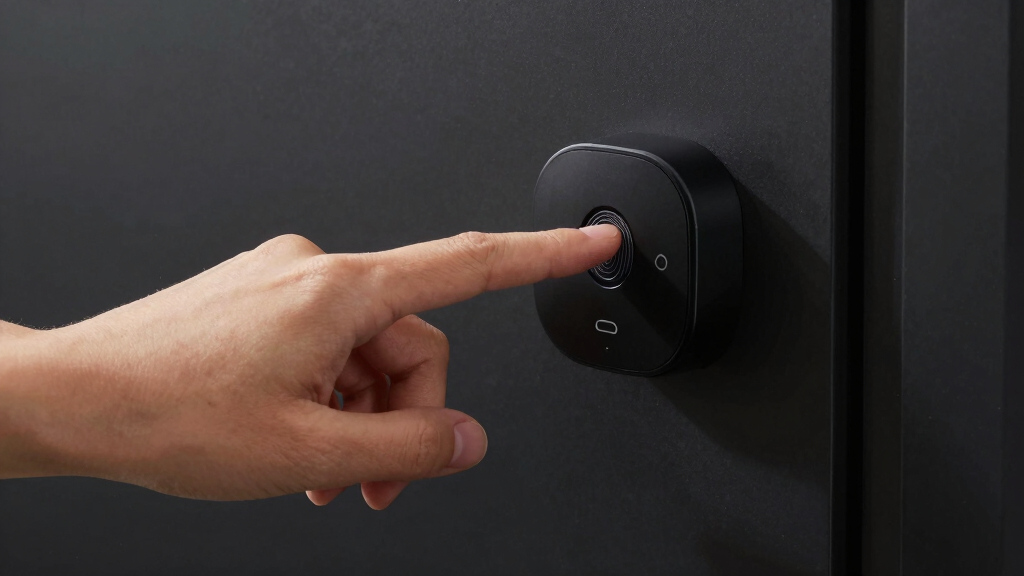

When searching for the best smart deadbolt with fingerprint, you want a reliable balance between security, convenience, and smart home compatibility. The Veise RZ07 stands out as the overall top pick for its robust biometric features and user-friendly app controls. The eufy Security Smart Lock C220 offers excellent waterproofing and remote management, making it ideal for outdoor setups. Meanwhile, the ULTRALOQ Bolt SE impresses with Matter compatibility for future-proof smart home integration. Still, each option involves tradeoffs—some prioritize ease of installation, others focus on advanced security or smart features. Keep reading for a full breakdown to find the best fit for your home.
Key Takeaways
- The most reliable fingerprint recognition tends to come from biometric sensors with multiple verification modes.
- Smart locks with built-in Wi-Fi tend to be easier to control remotely but may come at a higher price point.
- Durability and waterproofing vary significantly; outdoor models often need IP ratings to withstand weather.
- Compatibility with existing smart home systems like Alexa or Google Assistant influences ease of integration.
- Installation complexity ranges, so DIY-friendly options often feature simplified mounting and setup processes.





More Details on Our Top Picks
Veise RZ07 Fingerprint Smart Lock, 7-in-1 Keyless Entry with App Control, Biometric Touchscreen Deadbolt, Satin Nickel
The Veise RZ07 stands out for its array of unlocking options, including fingerprint, app, codes, and mechanical keys, making it highly adaptable for various users. Compared with the Veise VE017, it offers more access methods and remote management features, though it requires a separate gateway for smart home integration, adding complexity and cost. Its enhanced security with anti-hacking keypad and cloud connectivity provides peace of mind, but the need for the Veise G2 gateway and limited door thickness support are tradeoffs. Installation is straightforward on standard doors, and US-based support adds reliability.
Pros:- Multiple unlocking options including fingerprint, app, codes, and mechanical key
- Enhanced security features like anti-hacking keypad
- Remote management via app and web portal
- Easy to install on standard US doors
Cons:- Requires separate purchase of Veise G2 gateway for smart home integration
- App connection issues may necessitate resets
Best for: Homeowners or small business owners seeking flexible, multi-method access with high security and remote control capabilities.
Not ideal for: Users who want an all-in-one solution without extra purchases or who have non-standard door sizes.
- Unlock Methods:Fingerprint, App, Web portal, Fobs, Code, eKey sharing, Mechanical key
- Material:Satin Nickel
- Compatibility:Most US standard doors, 1-3/8″ to 2″ thick
- User Capacity:50 fingerprints, 250+ codes
- Connectivity:Wi-Fi with Veise G2 gateway (sold separately)
- Battery:Low battery alert
- Warranty:At least 2 years
Bottom line: This pick is ideal for users who prioritize flexible access methods and strong security controls, willing to handle additional setup for smart features.
eufy Security Smart Lock C220, Fingerprint Keyless Entry Door Lock, Built-in Wi-Fi, App Remote Control, Deadbolt, IP53 Waterproof
The eufy Security Smart Lock C220 offers a well-rounded balance of battery life, ease of use, and remote control, making it suitable for busy households. Its 8-month battery life surpasses many competitors like the Veise VE017, reducing maintenance. Built-in Wi-Fi enables control from anywhere without extra hubs, but the waterproof rating of IP53 limits water resistance, which could be a concern in harsh weather. Easy installation and compatibility with voice commands via Alexa or Google Assistant make it a strong contender for those seeking straightforward setup and dependable connectivity, though battery life may vary with frequent use.
Pros:- Long-lasting 8-month battery life
- Multiple unlocking methods including fingerprint, app, keypad, key, and voice commands
- Easy 15-minute installation without drilling
- Built-in Wi-Fi for remote access from anywhere
Cons:- Battery life may vary with usage; frequent access could shorten lifespan
- Limited water resistance with IP53 rating
Best for: Homeowners who want a durable, long-lasting smart lock with reliable Wi-Fi and voice control for everyday convenience.
Not ideal for: Users in extreme weather conditions requiring higher waterproof ratings or those with complex existing security systems needing advanced integrations.
- Battery Life:8 months
- Battery Type:8 AA batteries
- Connectivity:Wi-Fi
- Waterproof Rating:IP53
- Operating Temperature:-22℉ to 158℉ (-30℃ to 70℃)
- Dimensions:7.67 x 4.49 x 4.41 inches
- Recommended Uses:Home
Bottom line: This model appeals to users seeking a straightforward, durable, and remotely accessible lock with minimal maintenance needs.
Fingerprint Smart Deadbolt with Keypad – Keyless Entry Lock for Home, Apartment, Office, Airbnb, Rental, Kids & Seniors, App & Code Access, Auto-Lock, Easy DIY Install, Compatible with Alexa & Google
The Sifely Model O Deadbolt combines multiple access options, including fingerprint, keypad, app, and physical key, making it ideal for rental units or busy families. Compared with the Veise options, it supports remote management and scheduling via app, but requires a gateway for voice commands and remote access, adding an extra step. Its support for only 100 fingerprints and codes may limit larger households, and some users report connectivity hiccups. Still, its DIY-friendly installation and compatibility with Alexa and Google give it an edge for those managing multiple users and rental properties.
Pros:- Supports various unlocking methods including fingerprint, keypad, app, and key
- Easy DIY installation on most door types
- Remote management and scheduling via app
- Compatible with Alexa and Google Assistant
Cons:- Gateway required for remote app and voice control
- Limited to 100 fingerprints/codes, restricting large user groups
Best for: Rental property owners or family households needing multiple user access methods and easy setup.
Not ideal for: Large households with more than 100 users or those seeking fully integrated smart home ecosystems without additional gateways.
- Product Type:Smart Deadbolt
- Recommended Uses:Front Door, Rental, Airbnb, Home Office
- Unit Count:1
- Customer Rating:4.3/5
- Warranty:30-Day Return Guarantee
Bottom line: This lock fits well for rental hosts and busy families who need easy, multiple access modes with manageable setup complexity.
Built-in WiFi Fingerprint Smart Deadbolt with Keypad – Keyless Entry Lock for Home, Airbnb, Rental, Kids/Seniors, Remote App Access, Auto Lock, DIY Setup (No Gateway Needed), Alexa & Google Compatible
The Sifely Model O Deadbolt with Built-in Wi-Fi emphasizes ease of installation and direct Wi-Fi connectivity, eliminating the need for a hub or gateway. Its support for multiple unlock methods, including fingerprint, keypad, app, passcode, and key, makes it versatile for various users. The ability to control remotely and track activity via the app is a major plus, especially for vacation homes or rental properties. However, reliance on Wi-Fi means the lock’s remote features can be affected by network stability, and battery life may require frequent attention. Its compatibility is best suited to standard US doors and basic smart home setups.
Pros:- Easy DIY installation fits most standard US doors
- No hub or gateway needed for Wi-Fi connectivity
- Multiple unlocking methods including fingerprint, keypad, app, passcode, and key
- Supports remote control and activity tracking via app
Cons:- Requires stable Wi-Fi for remote features
- Battery life might need frequent replacement with heavy use
Best for: Homeowners or property managers seeking a straightforward, hub-free smart lock with remote control and activity logs.
Not ideal for: Users with unstable Wi-Fi or who need extensive smart home integration beyond basic voice assistants.
- Product Type:Lock
- Recommended Uses:Home, Airbnb, Rental, Kids & Seniors
- Included Components:Front and back panels, mounting plate, manuals, screws, 2 keys, 2 cards
- Item Dimensions:6.3 x 2.6 x 1.9 inches
- Warranty & Support:30-Day Return, full warranty
Bottom line: This model suits users who want quick, hassle-free installation and remote control without extra hubs or complicated setups.
Veise VE017 Fingerprint Smart Door Lock, App Control, 8-in-1 Keyless Entry, Auto Lock, Emergency Power Port, Touchscreen Keypad, Satin Nickel
The Veise VE017 offers a robust suite of security features, including AI-powered biometric verification, AES128 encryption, and activity logs. Its support for multiple unlocking methods—fingerprint, app, keypad, key, fob, code, voice—provides comprehensive access options, especially appealing for users prioritizing privacy and local data storage over cloud reliance. Compared with others like the eufy C220, its emphasis on encrypted local storage offers enhanced privacy. While the need for a G1 Gateway for remote access can be a downside, the full 2-year warranty and lifetime mechanical support add value for security-conscious buyers.
Pros:- Multiple unlocking options including biometric, app, keypad, and voice
- AI-powered biometric authentication for fast, secure access
- AES128 encryption and activity logs for enhanced privacy
- Includes emergency power port for backup access
Cons:- Requires G1 Gateway for remote app control and voice commands
- Batteries not included; might need frequent replacements
Best for: Homeowners or small business owners needing high-security features with local encryption and flexible access modes.
Not ideal for: Users seeking a plug-and-play device with minimal setup or those without the budget for additional gateways.
Bottom line: This lock provides advanced biometric security and local data privacy, making it ideal for security-focused users with technical setup capacity.
DESLOC Smart Door Lock B200, Keyless Entry Fingerprint Deadbolt with App Control
The DESLOC B200 stands out for its versatile unlocking options, including fingerprint, PIN, app, and physical keys, making it highly adaptable for different user preferences. Its straightforward installation and long battery life of around 12 months add to its appeal, especially for those seeking a reliable outdoor lock. Compared with the Philips Wi-Fi Smart Lock, the B200 offers more physical key backup and a more robust weather rating, but it requires batteries that need replacement annually, which could be a drawback. Its weather resistance and BHMA Grade 3 security standard make it suitable for outdoor use, though fingerprint recognition speed varies with AI learning, which might frustrate some users. This pick makes the most sense for homeowners who want a flexible, durable, and easy-to-install smart deadbolt with multiple access methods.
Pros:- Supports multiple unlocking methods including fingerprint, PIN, app, and keys
- Easy to install with minimal tools required
- Long battery life of approximately 12 months
- Weather-resistant and durable for outdoor use
Cons:- Requires batteries and may need replacement after a year
- Some features require separate device connections (e.g., G2 for voice control)
- Fingerprint recognition speed may vary with AI learning
Best for: Homeowners who need a durable, weatherproof lock with multiple unlocking options and easy installation
Not ideal for: Renters or users seeking a lock with integrated auto-lock sensors and advanced smart home integrations
- Model Number:B200
- Recommended Uses For Product:Entry Door
- Battery Life:12 months
- Weather Resistance:IP54-rated
- Security Standards:BHMA Grade 3
- Temperature Range:-22℉ to 158℉ (-30℃ to 70℃)
Bottom line: This is best for users seeking a flexible, weatherproof deadbolt with multiple access options and long-lasting batteries.
Philips Wi-Fi Smart Lock Keyless Entry Deadbolt for Front Door
Compared with the ULTRALOQ Bolt SE, the Philips Wi-Fi Smart Lock emphasizes remote control, real-time notifications, and up to 100 custom passcodes, making it ideal for larger households or those who want to monitor access closely. Its Wi-Fi connectivity allows for remote operation but only supports 2.4GHz networks, which could limit compatibility in some setups. While installation is straightforward, it requires 4 or 8 AA batteries (not included) and lacks an auto-lock sensor, potentially reducing its hands-free convenience. The absence of a door sensor means users must rely on manual checks or separate devices. This lock is perfect for tech-savvy homeowners who prioritize remote management and guest access control over integrated auto-lock features.
Pros:- Remote access and real-time notifications
- Supports up to 100 custom passcodes
- Easy DIY installation for most doors
- Supports multiple unlocking methods including app, fingerprint, passcode, and voice
Cons:- Requires 4 or 8 AA batteries (not included)
- Only supports 2.4GHz Wi-Fi networks
- No auto-lock or door sensor included
Best for: Owners who want remote access, real-time alerts, and customizable codes for family and guests
Not ideal for: Users seeking a lock with built-in auto-lock sensors or dual-band Wi-Fi support for more robust connectivity
- Connectivity:Wi-Fi (2.4GHz only)
- Power:4 or 8 AA alkaline batteries (not included)
- Supported Door Thickness:1-3/8″ to 2″
- Auto Lock Timer:10 to 180 seconds
- Voice Assistant Compatibility:Alexa, Google Assistant
- Remote Control Range:Up to 65 ft
Bottom line: Ideal for homeowners who value remote control, notifications, and flexible user codes over auto-lock features.
TEHO TE012W WiFi Smart Lock, Fingerprint Door Lock with Built-in Wi-Fi, Keyless Entry Keypad, App Control, Alexa Compatible, IP55 Waterproof, Satin Nickel
The TEHO TE012W is designed for outdoor durability with its IP55 weather resistance and easy installation, supporting multiple unlocking methods such as fingerprint, passcode, app, and backup keys. It offers auto-lock and secure sharing, making it suitable for rental properties or front doors exposed to the elements. While its weatherproof features surpass those of the Veise VE017, it requires 8 AA batteries, which need replacement over time, and it only supports 2.4GHz Wi-Fi networks. Its BHMA Grade 3 rating indicates decent security but not the highest commercial-grade level. This lock is a good fit for users seeking a resilient, outdoor-ready device that combines convenience with security, especially in rental or high-traffic scenarios.
Pros:- Supports multiple unlocking methods including fingerprint, passcode, app, and backup keys
- Weather-resistant IP55 rating suitable for outdoor use
- Easy installation with no drilling required
- Supports auto-lock and secure sharing
Cons:- Requires 8 AA batteries (not included)
- Wi-Fi only supports 2.4GHz networks
- Limited to BHMA Grade 3 durability
Best for: Renters or homeowners needing a weatherproof, easy-to-install lock for outdoor or rental properties
Not ideal for: Those looking for a high-grade, commercial-level security solution or dual-band Wi-Fi support
- Material:Satin Nickel
- Connectivity:Wi-Fi (2.4GHz)
- Weather Resistance:IP55
- Supported Unlock Methods:App, Fingerprint, Passcode, Backup Keys
- Battery Life:Up to 8 months
- Warranty:2 years
Bottom line: A solid choice for outdoor or rental properties needing weather resistance and flexible access options without high-grade security requirements.
ULTRALOQ Bolt SE Smart Lock with Wi-Fi and Matter Compatibility
Compared to the DESLOC B200, the ULTRALOQ Bolt SE emphasizes seamless integration with smart home ecosystems via Matter support and offers 7-in-1 access including fingerprint, passcodes, app, and voice control. Its Wi-Fi connection (2.4GHz only) enables remote management and eKey sharing, making it suitable for users who want to expand their smart home setup. While it doesn’t include a hub, its durable zinc alloy construction and weather resistance make it versatile for various environments. However, the lack of Bluetooth limits local pairing options, and no door sensor is included for auto-lock status. This lock suits those who prioritize ecosystem compatibility and remote access in a versatile deadbolt.
Pros:- Supports multiple access options including fingerprint, passcodes, app, and voice
- Seamless integration with Matter-enabled smart home devices
- Remote management and eKey sharing via Wi-Fi
- Weather-resistant and durable design
Cons:- Wi-Fi only, no Bluetooth connectivity
- Requires 2.4GHz Wi-Fi network, no dual-band support
- No included door sensor for auto-lock status
Best for: Homeowners invested in smart home ecosystems seeking a versatile, Wi-Fi-enabled deadbolt with broad access options
Not ideal for: Users requiring dual-band Wi-Fi support or a built-in door sensor for auto-lock status
- Model Number:ULTRALOQ BOLT SE
- Recommended Uses:front door, back door, rentals
- Connectivity:Wi-Fi 2.4GHz
- Weather Resistance:Yes
- Warranty:Lifetime mechanical, 18 months electronic
Bottom line: Best suited for users who want an ecosystem-compatible deadbolt with extensive remote management features and multiple access options.
Smart Deadbolt Lock with Fingerprint and App Control
This Smart Deadbolt offers a balanced mix of features, including fingerprint, app, PIN, keys, and fobs, covering most access scenarios. Its auto-lock feature and weatherproof rating make it suitable for both homes and rentals exposed to outdoor conditions. Unlike the Veise VE017, it supports remote control with an optional WiFi gateway, adding more convenience but requiring an extra accessory. Its multiple unlocking options are advantageous, but heavy use may drain batteries quickly, and some non-standard doors might not be fully compatible. This deadbolt is ideal for users who want a flexible, feature-rich lock that balances simplicity with advanced options, especially for rentals or multi-user households.
Pros:- Supports multiple unlocking options including fingerprint and app control
- Auto-lock and one-touch locking enhance security
- Weatherproof and suitable for outdoor use
- Easy DIY installation and setup
Cons:- Requires separate WiFi gateway for remote internet control
- Battery life may need frequent replacements with heavy use
- Compatibility with non-standard doors may vary
Best for: Homeowners or landlords who need a versatile, weatherproof lock with multiple access methods and auto-lock features
Not ideal for: Users seeking a fully integrated smart home system with built-in Wi-Fi without additional accessories
- Unlock Methods:App, Fingerprint, PIN, Keys, Fobs
- Auto Lock Time:1-180 seconds
- Battery Life:Up to 8 months
- Weatherproof Rating:IP54
- Security Grade:ANSI Grade 3
Bottom line: Best for users wanting a multifunctional, weatherproof deadbolt with auto-lock and flexible access methods for home or rental use.
LOCKSTAR® Smart Door Lock – Keyless Entry Deadbolt with Multiple Access Methods
The LOCKSTAR® Smart Door Lock offers a compelling mix of multiple access methods, including fingerprint Touch ID, keypad code, app control, card FOB, and traditional key, making it highly adaptable. Compared with GeekTale, it excels in auto-lock functionality and real-time notifications, but it requires a Wi-Fi gateway for remote control, adding extra setup complexity and potential costs. Its easy DIY installation suits rental properties or tech-savvy users, but battery life may demand frequent replacements. This pick makes the most sense for households that value multiple secure entry options at an affordable price.
Pros:- Multiple secure access methods including app, fingerprint, keypad, card, and key
- Auto-lock feature improves convenience and security
- Real-time event notifications via app for peace of mind
- Simple DIY installation with included tools
Cons:- Requires Wi-Fi gateway for remote access
- Battery life may require regular replacement
- App setup can be complex for some users
Best for: Families or renters seeking flexible, multi-method access with straightforward installation.
Not ideal for: Users looking for remote management without extra equipment or those concerned about frequent battery changes.
- Brand:LOCKSTAR
- Model Number:LS-SDL
- Recommended Uses:Activity Monitoring, Child Safety, Elderly Security
- Included Components:Screwdriver, Drill Piece, Smart Door Lock
- Item Dimensions:1.18 x 2.64 x 6.46 inches
- Item Weight:1 Pound
Bottom line: This is a versatile, budget-friendly option suited for users wanting multiple access methods without heavy smart home integration.
GeekTale Fingerprint Deadbolt with App – Smart Keyless Entry Door Lock
The GeekTale fingerprint deadbolt emphasizes ease of use with multiple unlocking options, including a fingerprint scanner with 360° ID and app control. Its user management system supports up to 50 users, making it suitable for shared households or small offices. Compared to ULTRALOQ 2026, it offers straightforward installation and a dedicated app, but a gateway purchase is required for remote access, which adds to the setup complexity. Its limited user capacity might not suit larger households, and app setup can be challenging for some. This lock is ideal for those who want manageable user access and remote control in smaller settings.
Pros:- Multiple unlocking options including fingerprint, app, and backup keys
- Easy to install and manage users
- Remote control and notifications enhance security
- Quick 15-minute installation
Cons:- Gateway purchase required for remote access
- Limited capacity for large households
- App setup might be complex for some users
Best for: Small households or offices needing easy user management and reliable remote access.
Not ideal for: Larger families or users seeking an extensive user capacity or fully integrated smart home features without gateways.
- Unlock Methods:Fingerprint, App Bluetooth, Backup Keys
- Bluetooth Range:10 meters
- Fingerprint ID:360°
- User Capacity:Up to 50 users
- Auto-lock Timing:5-60 seconds
- Material:Aluminum alloy (outdoor), plastic (indoor)
Bottom line: This lock suits small to medium households prioritizing user control and remote notifications, with some setup caveats.
ULTRALOQ 2026 Upgrade Bolt Fingerprint Smart Lock in Black, Biometric Deadbolt with Built-in WiFi, Keyless Entry, App Control, IP65 Waterproof, BHMA Grade AAA
The ULTRALOQ 2026 Upgrade Bolt stands out for its comprehensive set of unlocking methods, including fingerprint, app, voice control, and mechanical key. Its built-in WiFi eliminates the need for a gateway, offering seamless remote access, and its compatibility with major smart home platforms enhances integration. Compared to Veise KS02A, it provides a higher security grade (BHMA Grade AAA) and more advanced features, but it demands regular battery replacements approximately every 10 months and may present a steeper initial setup. Its waterproof and security certifications make it suitable for demanding environments, ideal for users wanting premium features and smart home connectivity. This pick makes the most sense for tech-savvy homeowners seeking a robust, fully integrated smart deadbolt.
Pros:- Multiple unlocking methods including fingerprint and app control
- Built-in WiFi for remote management without extra hub
- Auto-lock and auto-unlock features for convenience
- High security with ANSI Grade 1 deadbolt and anti-attack resistance
Cons:- Battery replacement needed approximately every 10 months
- Initial setup can be complex for some users
- Separate hub required for full smart home integration
Best for: High-end homeowners wanting a fully featured, reliable, and smart-connected deadbolt with biometric security.
Not ideal for: Budget-conscious users or those with limited technical skills who may find setup and maintenance challenging.
- Brand:ULTRALOQ
- Model Number:BOLT-F-W-NK
- Color:Black
- Battery Life:Up to 10 months
- Waterproof Rating:IP65
- Security Certification:BHMA Grade AAA
Bottom line: This is a premium, feature-rich deadbolt designed for users who prioritize advanced security and seamless smart home integration.
Veise KS02A Fingerprint Keyless Entry Door Lock, Auto Lock, Electronic Keypad Deadbolt, Matte Black
The Veise KS02A combines biometric fingerprint recognition with multiple access options, including passwords and keys, all housed in a durable, weather-resistant zinc alloy body. Its AI fingerprint recognition is quick and reliable, making it suitable for outdoor use in harsh conditions. Compared with ULTRALOQ 2026, it offers a simpler setup and longer battery life—up to 365 days—though it requires 4 AA batteries. Its ANSI Grade 3 rating and IP54 waterproof rating make it a solid choice for residential or commercial applications, but its limited user capacity and occasional connectivity issues might hinder larger or more tech-dependent households. This lock is best for users seeking rugged durability and reliable biometric security outside.
Pros:- Advanced AI fingerprint recognition for quick unlocking
- Long battery life up to 365 days
- Weather-resistant, durable metal construction
- Easy DIY installation with detailed instructions
Cons:- Requires 4 AA batteries (not included)
- Limited to standard door sizes
- Some users report occasional connectivity issues
Best for: Residential or commercial users needing a weatherproof, durable lock with biometric and backup options.
Not ideal for: Large households or users seeking extensive smart home features and large user management capacity.
- Fingerprint Storage:20 fingerprints
- Password Storage:20 user passwords + master password
- Auto Lock Time:10-99 seconds
- Battery Life:Up to 365 days
- Material:All-metal, zinc alloy
- Waterproof Rating:IP54
Bottom line: This lock makes the most sense for outdoor applications where weather resistance and durability are priorities, with reliable biometric access.

How We Picked
Products were selected based on their fingerprint recognition reliability, ease of installation, build quality, and smart home compatibility. We prioritized models with consistent biometric performance in various conditions and considered whether they offer remote access via app or voice commands. Durability, especially for outdoor use, was also a key factor, with IP ratings and weather resistance playing a role. Additionally, we examined the overall value, factoring in price, features, and user reviews to rank these options fairly. Our goal was to highlight models that balance security, convenience, and usability for different types of homeowners.Factors to Consider When Choosing Best Smart Deadbolt With Fingerprint
Choosing the best smart deadbolt with fingerprint involves more than just biometric accuracy. You should consider how the lock integrates with your smart home system, the ease of installation, and durability for your environment. Security features like anti-spoofing measures and backup access methods also matter. Understanding these factors helps prevent common pitfalls, such as choosing a model incompatible with your existing setup or one that isn’t weatherproof for outdoor use. This guide highlights key considerations to help you make an informed decision.Biometric Recognition Quality
High-quality fingerprint sensors reduce false rejections and spoofing risks. Look for models that support multiple verification methods, such as fingerprint and PIN, to enhance security. A sensor with a larger scanning area can improve recognition speed and accuracy, especially for multiple users or in low-light conditions. Cheaper sensors often lead to frustration, so investing in proven biometric tech is wise for long-term reliability.
Smart Home Compatibility
Consider whether the lock works with your existing smart home ecosystem—whether that’s Alexa, Google Assistant, Apple HomeKit, or others. Compatibility makes remote control, voice commands, and automation much smoother. Some locks require additional hubs or gateways, adding complexity and cost, while others have built-in Wi-Fi or Bluetooth for direct connection. Think about your future smart home plans to choose a model that scales with your setup.
Weather Resistance and Durability
If you plan to install the deadbolt outside, weatherproofing becomes critical. Look for models with IP ratings indicating resistance to water, dust, and temperature fluctuations. Outdoor locks face harsher conditions, so durability features like reinforced housings and corrosion-resistant components are worth the extra investment. Indoor models, however, can often forgo these features for a sleeker design and lower cost.
Ease of Installation and Use
DIY installation varies widely, so check if the lock comes with detailed instructions and compatible door measurements. Some models include tools for quick mounting, while others may require more technical skills. Once installed, user management—adding or removing fingerprints—and app setup should be straightforward. A complicated setup process can deter users from fully utilizing all features, so balance convenience with security.
Additional Security and Backup Options
Biometric locks should have backup methods like keypad codes or physical keys to prevent lockout in case of sensor failure or battery drain. Features such as auto-lock, tamper alarms, or anti-spoofing security measures add layers of protection. Always check the power source—batteries should last long, and some models offer emergency ports or alert notifications for low power. These extras prevent common issues and enhance overall security.
Frequently Asked Questions
Can I rely on fingerprint recognition in cold or rainy weather?
Many fingerprint sensors can struggle with recognition if your fingers are cold, wet, or dirty. High-quality biometric sensors designed for outdoor use often incorporate features to mitigate these issues, such as larger scanning areas or multiple verification modes. It’s advisable to choose a model with positive reviews regarding outdoor performance if you plan to install outside. Additionally, always have backup access methods to avoid lockouts during adverse weather conditions.
Are smart deadbolts with fingerprint safe from hacking?
While biometric data is generally secure, no system is entirely foolproof. Reputable models use encryption and anti-spoofing measures to prevent hacking or biometric cloning. Regular firmware updates from manufacturers also help patch vulnerabilities. To maximize security, opt for locks with multi-factor authentication options, such as combining fingerprint with PIN or app control, and ensure your Wi-Fi network is protected with strong passwords.
How long do the batteries last on these smart deadbolts?
Battery life varies depending on usage and features, with most models lasting from several months to over a year on a set of batteries. Locks with energy-efficient biometric sensors and minimal wireless communication tend to last longer. Some models include low-battery alerts or emergency power ports to prevent lockouts. It’s wise to choose a lock with clear battery status indicators and easy replacement methods to maintain security without surprises.
Can I install these locks myself, or do I need a professional?
Most smart deadbolts with fingerprint are designed for DIY installation, with straightforward mounting kits and detailed instructions. However, the complexity can vary based on your door type and existing hardware. If your door has unusual dimensions or you’re uncomfortable with electrical wiring or smart home integrations, hiring a professional might be a safer choice. Reading user reviews about installation ease can also guide your decision.
Do these locks work with smart home systems like Alexa or Google Assistant?
Compatibility depends on the specific model; most high-end options support integration with popular voice assistants. Locks with built-in Wi-Fi or Zigbee/Z-Wave modules tend to be more versatile, allowing voice control and automation routines. Confirm support for your existing ecosystem before purchasing, and consider whether the lock requires additional hubs or bridges for full functionality. This compatibility can greatly enhance convenience and security management.
Conclusion
For most homeowners seeking a reliable, easy-to-use smart deadbolt with fingerprint, the Veise RZ07 remains the best overall choice thanks to its balance of biometric performance and smart features. Those prioritizing outdoor durability and remote control might find the eufy Security Smart Lock C220 best suited. If you want a premium, future-proof option, the ULTRALOQ Bolt SE offers Matter support for seamless smart home integration. Beginners should look for models with straightforward installation and simple app controls, while advanced users may prefer options with extensive compatibility and security features. Tailor your choice to your environment, tech setup, and security needs to find the ideal fit.