

For most travelers seeking a silent, fanless MacBook, I’d put the 15-inch MacBook Air with M5, 16GB memory, and 512GB SSD first: it pairs a roomier screen and newer chip with more memory and storage than the older options here. The 13.3-inch M1 Air is the compact pick, while a 15-inch M2 Air offers a larger display without moving to the newest generation. Every MacBook Air in this lineup uses a fanless design, so the choice comes down to size, workload, configuration, and whether renewed condition suits you. A bigger screen is useful on a long trip but takes more bag space; older or lower-capacity configurations may ask you to manage memory and files more carefully. Read on for my full breakdown of who each model suits and what you give up with each one.

Turn the school run and nap time into listening time
- Thousands of audiobooks, podcasts and originals
- Listen on your phone, tablet or Echo — also offline
- Cancel anytime
Complete the kit


Key Takeaways
- The M5 15-inch configurations lead for headroom: their 16GB of memory and 512GB SSD separate them from the listed M1 and M2 models, which have 8GB of memory.
- Screen size is the main travel tradeoff: the 13.3-inch M1 options favor a smaller carry, while the 15-inch models offer more workspace at the cost of a larger footprint.
- Storage varies in a way that affects travel: most older options list 256GB, the M1 renewed silver listing has 128GB, and the M5 models and renewed M2 silver offer 512GB.
- Color variants do not change the core configuration: the M5 Starlight, Midnight, and Sky Blue choices share listed chip, memory, and storage; pick by finish, not expected speed.
- Renewed listings add condition uncertainty: they can expand the range of configurations, but buyers should check the seller’s condition details, warranty, and return terms.





| silent fanless macbooks for travel | Display | Battery life | Memory | Storage |
|---|---|---|---|---|
| Apple MacBook Air 13.3-inch | 13.3-inch Retina with True Tone | — | 8GB unified memory | 128GB SSD |
| Apple 15-inch MacBook Air with | 15.3-inch Liquid Retina, supports 1 billion colors | Up to 18 hours | 16GB unified memory | 512GB SSD |
| Apple 15-inch MacBook Air with | 15.3-inch Liquid Retina | Up to 18 hours | 16GB unified memory | 512GB SSD |
| Apple MacBook Air 15-inch Lapt | 15.3-inch Liquid Retina | Up to 18 hours | 16GB unified memory | 512GB SSD |
| Apple MacBook Air 15-inch Lapt | 15.3-inch Liquid Retina | Up to 18 hours | — | — |
| Apple MacBook Air 15-inch | 15.3-inch Liquid Retina, 500 nits, P3 wide color | Up to 18 hours | 8GB unified memory | 256GB SSD |
| Apple MacBook Air 13.3-inch | 13.3-inch Retina with True Tone | — | 8GB unified memory | 128GB SSD |
| Apple MacBook Air 15-inch | 15.3-inch Liquid Retina | Up to 18 hours | 8GB unified memory | 256GB SSD |
| Apple MacBook Air 13.3-inch La | 13.3-inch Retina | Up to 18 hours | 8GB unified memory | 256GB SSD |
| Apple MacBook Air 15-inch | 15.3-inch Liquid Retina, 500 nits, P3 wide color | Up to 18 hours | 8GB unified memory | 256GB SSD |
| Apple 2023 MacBook Air 15-inch | 15.3-inch Liquid Retina, 500 nits, P3 wide color | Up to 18 hours | — | — |
| Apple MacBook Air 15-inch with | 15.3-inch Liquid Retina, up to 500 nits, P3 wide color | Up to 18 hours | — | — |
More Details on Our Top Picks
Apple MacBook Air 13.3-inch (2020, M1, 8GB RAM, 128GB SSD) – Silver, Renewed Premium
I’d choose this 13.3-inch fanless Air when quiet operation and a smaller travel footprint matter more than screen space. Its M1 chip and 8GB of unified memory suit everyday tasks such as writing, browsing, and video calls, while the Retina display with True Tone provides a comfortable workspace on the go. Compared with the newer 15-inch M5 MacBook Air options here, it is the more compact choice, but gives up their larger displays, 16GB memory, and 512GB SSDs. The biggest compromise is its 128GB storage, which can fill quickly if you keep photos, media, or large work files locally. Its renewed condition also differs from the new M5 models, so buyers should weigh that against their preference for a smaller, less capable configuration.
Pros:- Fanless design runs silently, useful in quiet cabins and shared workspaces.
- Compact 13.3-inch size is easier to fit into a travel bag than the 15-inch models.
- M1 chip and 8GB unified memory suit common travel and office tasks.
- Retina display with True Tone supports comfortable everyday viewing.
Cons:- 128GB SSD leaves limited room for locally stored files and applications.
- 8GB memory is less generous than the 16GB in the M5 models.
- Renewed Premium condition may not suit buyers who prefer a new laptop.
Best for: Travelers who prioritize a compact 13.3-inch laptop for writing, web browsing, and video calls, and keep most files in cloud storage.
Not ideal for: People who store large photo or video libraries locally, need a roomy multitasking setup, or want the larger screen and newer hardware of the 15-inch M5 models.
- Model:MacBook Air (2020)
- Chip:Apple M1, 8-core CPU and 7-core GPU
- Memory:8GB unified memory
- Storage:128GB SSD
- Display:13.3-inch Retina with True Tone
- Design:Fanless
- Condition and color:Renewed Premium, Silver
Our verdict“Choose this renewed M1 Air if a compact, silent laptop matters more than storage capacity or the larger displays of the 15-inch models.”
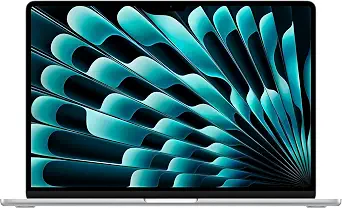
Apple 15-inch MacBook Air with M5 chip, 16GB memory, 512GB SSD, and Starlight finish
This Starlight configuration is the stronger fit for travelers who need a roomy screen and long unplugged work sessions but still want a fanless, silent MacBook Air. The listed battery life is up to 18 hours, and the 15.3-inch Liquid Retina display gives documents and side-by-side windows more space than the 13.3-inch 2020 M1 Air. Its 16GB memory and 512GB SSD also provide more headroom than that compact model’s 8GB and 128GB. The tradeoff is physical: at 15 inches, it takes more bag space than the smaller Air, and its two Thunderbolt 4 ports may call for an adapter when connecting several accessories. Compared with the similar Silver M5 configuration, its listed differentiators are the Starlight finish and the same large-screen, high-capacity travel setup.
Pros:- Fanless MacBook Air design provides silent operation.
- Up to 18 hours of listed battery life supports long stretches away from a charger.
- 15.3-inch display, 16GB memory, and 512GB SSD offer more working room than the 2020 M1 Air.
- 12MP Center Stage camera supports video calls while keeping the user in frame.
Cons:- The 15.3-inch chassis occupies more bag space than a 13.3-inch Air.
- Two Thunderbolt 4 ports can limit direct wired connections.
- Its feature set may be more than needed for travelers with basic computing tasks.
Best for: Remote workers and students who travel with documents, video calls, and several applications open and value extended battery life over a smaller bag footprint.
Not ideal for: Light packers who want the smallest laptop possible, or travelers who regularly connect several wired peripherals without a hub.
- Chip:Apple M5
- Display:15.3-inch Liquid Retina, supports 1 billion colors
- Memory:16GB unified memory
- Storage:512GB SSD
- Battery life:Up to 18 hours
- Camera:12MP Center Stage
- Wireless:Wi-Fi 7 and Bluetooth 6
- Ports:Two Thunderbolt 4, MagSafe charging, headphone jack
- Color:Starlight
Our verdict“Pick the Starlight M5 Air for silent travel work that benefits from a large display, substantial storage, and long listed battery life.”
Apple 15-inch MacBook Air with M5 chip, 16GB memory, and 512GB SSD
Among these configurations, I’d give the Silver 15-inch M5 Air the role of portable desk replacement: its large display, 16GB memory, and 512GB SSD make it better suited to sustained multitasking than the 2020 M1 Air with 8GB and 128GB. For travel, the listed 3.32-pound weight and 0.45-inch thickness help put its broad screen in context, though a 13.3-inch laptop remains easier to pack. The fanless design shared by MacBook Air models means it can work silently in quiet spaces. Up to 18 hours of listed battery life also favors days away from an outlet. Its constraints are the same ones travelers should weigh against the Starlight M5 version: just two Thunderbolt 4 ports and a larger body than a compact Air.
Pros:- Fanless design supports silent work in shared and quiet spaces.
- 15.3-inch Liquid Retina display gives more room for documents and multitasking than the 13.3-inch M1 Air.
- 16GB unified memory and 512GB SSD exceed the supplied M1 model’s memory and storage.
- Up to 18 hours of listed battery life and a 3.32-pound weight suit mobile work.
Cons:- Larger dimensions take more room in a travel bag than the 13.3-inch Air.
- Two Thunderbolt 4 ports may require a hub for multiple wired devices.
- The listed memory and storage are fixed at 16GB and 512GB.
Best for: Traveling professionals who work with multiple windows, want a large built-in screen, and carry files locally rather than relying entirely on cloud storage.
Not ideal for: Minimalist travelers who prioritize the smallest possible laptop, or users who need several direct Thunderbolt connections.
- Model:MDV94LL/A
- Chip:Apple M5
- Display:15.3-inch Liquid Retina
- Memory:16GB unified memory
- Storage:512GB SSD
- Battery life:Up to 18 hours
- Weight and dimensions:3.32 pounds; 13.4 × 9.35 × 0.45 inches
- Ports:Two Thunderbolt 4, MagSafe charging, headphone jack
- Color:Silver
Our verdict“Choose this Silver M5 Air when your travel workload needs a big screen and more local storage than the compact M1 model provides.”
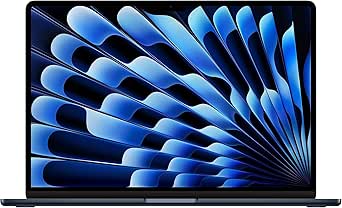
Apple MacBook Air 15-inch Laptop with M5 Chip, 16GB Memory, 512GB SSD, Midnight
The Midnight M5 Air offers the same core travel setup as the Silver and Sky Blue 15-inch M5 versions: a fanless design, 16GB memory, 512GB storage, and a 15.3-inch display. That makes its clearest distinction its Midnight finish, rather than a different work profile. Compared with the renewed 13.3-inch M1 Air, it brings a larger screen, more memory, and more storage for travelers juggling documents, calls, and locally saved files. The listed battery life is up to 18 hours, while the 3.32-pound body remains heavier and broader than that compact alternative. Two Thunderbolt 4 ports also mean this isn’t the best match for a cable-heavy mobile setup without an adapter. Choose it for the color preference, not an advantage over the other M5 finishes.
Pros:- Fanless operation avoids fan noise in libraries, cabins, and shared offices.
- 16GB memory and 512GB SSD offer more room for multitasking and local files than the listed M1 Air.
- 15.3-inch display provides a larger workspace than the 13.3-inch alternative.
- Up to 18 hours of listed battery life and a 3.32-pound weight suit mobile work.
Cons:- The 15-inch body is less compact to pack than the 13.3-inch M1 Air.
- Only two Thunderbolt 4 ports may require an adapter for several peripherals.
- The supplied data gives no functional distinction from the other 15-inch M5 color configurations.
Best for: Travelers who want a silent 15-inch MacBook Air with the M5 configuration and specifically prefer a Midnight finish.
Not ideal for: Buyers choosing solely for a unique performance or portability advantage over the Silver and Sky Blue M5 versions, or those who need more than two Thunderbolt ports.
- Model:MDVH4LL/A
- Chip:Apple M5
- Display:15.3-inch Liquid Retina
- Memory:16GB unified memory
- Storage:512GB SSD
- Battery life:Up to 18 hours
- Weight and dimensions:3.32 pounds; 13.4 × 9.35 × 0.45 inches
- Wireless:Wi-Fi 7 and Bluetooth 6
- Color:Midnight
Our verdict“Choose the Midnight version if you want the 15-inch M5 Air’s silent travel setup and prefer this finish over Silver or Sky Blue.”
Apple MacBook Air 15-inch Laptop with M5 Chip, 16GB Memory, 512GB SSD, Sky Blue
For travel days built around remote meetings, this Sky Blue 15-inch M5 Air pairs silent fanless operation with a 12MP Center Stage camera and the larger screen of the 15.3-inch models. Its camera and six-speaker system make video calls a stronger part of the package than on the supplied 2020 M1 Air, whose description does not list those features. The 16GB memory and 512GB SSD also give it more room for active work and saved files. Against the Silver and Midnight M5 configurations, however, the supplied data shows no meaningful hardware advantage; the practical distinction is the Sky Blue finish. It remains a relatively broad laptop for light packers, and two Thunderbolt 4 ports may not cover a meeting setup with several wired accessories.
Pros:- Fanless operation keeps video calls and work sessions quiet.
- 12MP Center Stage camera is suited to frequent calls while traveling.
- 15.3-inch display, 16GB memory, and 512GB SSD provide more workspace and capacity than the listed M1 Air.
- Up to 18 hours of listed battery life and a six-speaker system with Spatial Audio.
Cons:- The 15.3-inch size is less compact than a 13.3-inch travel laptop.
- Two Thunderbolt 4 ports may be limiting with several wired accessories.
- The supplied specifications do not show a hardware advantage over the Silver or Midnight M5 versions.
Best for: Remote workers and students who travel frequently for video meetings and want a large screen, Center Stage camera, and more storage than the compact M1 Air.
Not ideal for: Travelers seeking the smallest bag footprint, or buyers expecting Sky Blue to offer different hardware from the other listed 15-inch M5 finishes.
- Model:MDVQ4LL/A
- Chip:Apple M5
- Display:15.3-inch Liquid Retina
- Memory and storage:16GB unified memory; 512GB SSD
- Camera:12MP Center Stage
- Battery life:Up to 18 hours
- Weight and dimensions:3.32 pounds; 13.4 × 9.35 × 0.45 inches
- Wireless:Wi-Fi 7 and Bluetooth 6
- Color:Sky Blue
Our verdict“Pick the Sky Blue M5 Air if video calls are central to your travel work and you prefer its finish over the otherwise similar M5 configurations.”
Apple MacBook Air 15-inch (2023) with M2 Chip, 8GB Memory, 256GB SSD, and Touch ID — Silver
The 15.3-inch screen is the main reason I’d choose this Air over the 13.3-inch M1 models: it gives documents, timelines, and split-screen work more room without adding much thickness. Its fanless M2 design keeps operation silent, while the listed battery life of up to 18 hours suits long stretches away from an outlet. At 3.3 pounds, though, it weighs more and takes up more bag space than the 2.8-pound M1 Air. The 8GB memory and 256GB SSD also leave less headroom for demanding multitasking or large offline libraries than higher-capacity configurations in the roundup. I’d pick this Silver version over the nearly identical Starlight model based on finish preference, not a meaningful performance difference. Its limited port selection may also call for adapters.
Pros:- 15.3-inch, 500-nit Liquid Retina display with P3 wide color
- Fanless design operates silently
- Up to 18 hours of listed battery life
- 1080p camera and six-speaker audio suit calls and media
Cons:- Heavier and larger in a bag than the 13.3-inch M1 Air
- 8GB memory can restrict demanding multitasking
- Two Thunderbolt ports plus MagSafe provide limited peripheral connections
Best for: Traveling writers, analysts, and remote workers who want a roomy screen for side-by-side apps and can pack a slightly larger laptop.
Not ideal for: Frequent flyers prioritizing the smallest, lightest carry-on setup, or creative users who need more than 8GB of memory and 256GB of storage.
- Display:15.3-inch Liquid Retina, 500 nits, P3 wide color
- Processor:Apple M2, 8-core CPU
- Graphics:10-core GPU
- Memory:8GB unified memory
- Storage:256GB SSD
- Battery life:Up to 18 hours
- Weight:3.3 pounds
- Ports:MagSafe, two Thunderbolt ports, headphone jack
Our verdict“Choose this Silver M2 Air if a large, silent screen matters more to your travel work than minimum carry weight.”
Apple MacBook Air 13.3-inch (2020, M1, 8GB RAM, 128GB SSD, Space Gray, Renewed Premium)
For travel where every bit of bag space matters, this 13.3-inch fanless Air is a more compact choice than the 15-inch M2 models. Its silent operation suits libraries, shared rooms, and quiet cabins, and the M1 chip gives this older model a capable foundation for everyday browsing, writing, and video calls. The tradeoff is the configuration: 128GB storage can fill quickly with downloaded files, while 8GB memory leaves limited room for heavy multitasking. Compared with the gold 13.3-inch M1 Air in this lineup, this renewed Space Gray version has less listed storage and no supplied battery-life or weight figure in its product data. Its renewed condition may also matter to buyers who prefer a new device. I’d choose it for compactness and routine work, not long-term storage headroom.
Pros:- Compact 13.3-inch form factor is easier to pack than the 15-inch models
- Fanless design runs silently
- M1 processor with 8-core CPU and 7-core GPU
- Retina display includes True Tone
Cons:- 128GB SSD offers little room for large offline files
- 8GB unified memory can constrain demanding multitasking
- Renewed condition may not suit buyers seeking a new device
Best for: Light-traveling students and document-focused workers who want a small, silent MacBook Air and can keep files in cloud or external storage.
Not ideal for: Travelers who store large media libraries locally, run demanding apps, or specifically want a new laptop rather than a renewed one.
- Model year:2020
- Processor:Apple M1, 8-core CPU
- Graphics:7-core GPU
- Display:13.3-inch Retina with True Tone
- Memory:8GB unified memory
- Storage:128GB SSD
- Design:Fanless
- Condition:Renewed Premium
Our verdict“Pick this renewed M1 Air for compact, quiet everyday travel computing if 128GB of storage is enough for your workflow.”
Apple MacBook Air 15-inch (2023) with M2 Chip, 8-Core CPU, 10-Core GPU, 8GB RAM, 256GB SSD, Midnight (Renewed)
This renewed Midnight configuration brings the 15.3-inch M2 Air experience to travelers who want a broad, bright workspace and silent operation. Its fanless enclosure avoids fan noise during focused work, while the listed up-to-18-hour battery life is well suited to travel days. Against the Silver 15-inch M2 Air in this batch, the core configuration is similar: 8GB memory and a 256GB SSD, with the key distinction being renewed condition and finish rather than a clear performance advantage. That memory and storage combination is best for everyday workloads, not extensive creative projects or a large offline collection. The listing also names macOS 10.15 Catalina, so I’d verify the installed operating system and software compatibility before buying. At 3.3 pounds, it is less compact than either 13.3-inch M1 option.
Pros:- 15.3-inch Liquid Retina display offers more workspace than the 13.3-inch M1 models
- Fanless design runs silently
- Up to 18 hours of listed battery life
- Backlit Magic Keyboard with Touch ID
Cons:- Renewed condition may not suit buyers who prefer new hardware
- 8GB memory and 256GB storage limit demanding workloads and large local libraries
- At 3.3 pounds, it is bulkier to carry than the 13.3-inch Airs
Best for: Travelers seeking a large-screen, silent M2 laptop in a renewed configuration for documents, browsing, calls, and media.
Not ideal for: Buyers who want a new device, need generous local storage, or prioritize a compact and light travel laptop.
- Model:MacBook Air (2023)
- Chip:Apple M2, 8-core CPU
- Graphics:10-core integrated GPU
- Display:15.3-inch Liquid Retina
- Memory:8GB unified memory
- Storage:256GB SSD
- Battery life:Up to 18 hours
- Weight:3.3 pounds
- Condition:Renewed
Our verdict“Choose this renewed Midnight M2 Air if you value a large silent display over compactness and are comfortable checking the device’s software and condition details.”
Apple MacBook Air 13.3-inch Laptop with M1 Chip, 8GB RAM, 256GB SSD, Gold
The Gold M1 Air is the most travel-friendly balance in this group for buyers who want a 13.3-inch screen and 2.8-pound weight without dropping to the 128GB SSD of the renewed Space Gray M1. Its fanless design keeps work quiet, and the listed battery life of up to 18 hours supports a day of mobile use when conditions allow. Compared with the 15-inch M2 models, it gives up screen area, a 1080p camera, and six-speaker audio; in return, it is easier to fit into a smaller bag. The 8GB memory and 256GB storage still set limits for heavy creative work and sizable offline files. For writing, browsing, and standard app use, those compromises are easier to accept than the reduced storage on the 128GB alternative.
Pros:- 2.8-pound weight is lighter than the 15-inch M2 Air models
- Fanless design operates quietly
- 256GB SSD provides more room than the 128GB renewed M1 option
- Up to 18 hours of listed battery life, with Touch ID
Cons:- 13.3-inch display offers less workspace than the 15.3-inch M2 models
- 8GB memory may restrict demanding multitasking
- 256GB storage can be tight for extensive offline media or project files
Best for: Commuters and frequent flyers who want a light, quiet laptop for writing, browsing, video calls, and moderate local file storage.
Not ideal for: Users who need a large workspace, substantial local storage, or more than 8GB of memory for intensive creative workloads.
- Processor:Apple M1, 8-core CPU
- Display:13.3-inch Retina
- Memory:8GB unified memory
- Storage:256GB SSD
- Battery life:Up to 18 hours
- Weight:2.8 pounds
- Dimensions:11.97 x 0.63 x 8.36 inches
- Camera:FaceTime HD camera
- Biometric security:Touch ID
Our verdict“Choose the Gold M1 Air if low carry weight and silent everyday use matter more than a large display or high-capacity configuration.”
Apple MacBook Air 15-inch (2023) with M2 Chip, 8GB Memory, 256GB SSD, Starlight
For travelers who spend their laptop time on calls, films, or shared viewing, this Starlight Air pairs a 15.3-inch Liquid Retina display with a 1080p camera and six-speaker audio. The fanless M2 design keeps the laptop silent, while its listed battery life of up to 18 hours makes it a strong option for work away from a desk. Its configuration closely matches the Silver 15-inch M2 Air in this batch, so I’d choose between them by finish and the included product details rather than expecting a meaningful difference in core performance. Both are 3.3 pounds and have 8GB memory and 256GB storage; neither is as easy to pack as the 2.8-pound Gold M1 Air. The small memory and SSD also make this less suitable for demanding projects or extensive offline media libraries.
Pros:- 15.3-inch, 500-nit display with P3 wide color
- Fanless design runs silently
- 1080p camera and six-speaker audio suit calls and entertainment
- Up to 18 hours of listed battery life
Cons:- 3.3-pound weight makes it less portable than the 13.3-inch M1 Air
- 8GB unified memory limits demanding multitasking
- 256GB SSD may not fit large project files or media collections
Best for: Remote workers and frequent travelers who take video calls and want a larger screen with stronger built-in audio for media.
Not ideal for: Minimal-pack travelers, heavy multitaskers, or anyone who needs more than 256GB of internal storage for offline files.
- Processor:Apple M2, 8-core CPU
- Graphics:10-core GPU
- Display:15.3-inch Liquid Retina, 500 nits, P3 wide color
- Memory:8GB unified memory
- Storage:256GB SSD
- Camera:1080p FaceTime HD
- Battery life:Up to 18 hours
- Weight:3.3 pounds
- Connectivity:MagSafe, two Thunderbolt ports, headphone jack
Our verdict“Pick the Starlight M2 Air if calls and media benefit from a large display, good built-in audio, and a silent design more than they benefit from a lighter bag.”
Apple 2023 MacBook Air 15-inch with M2 Chip, 8GB Memory, 256GB SSD, and 1080p Camera (Midnight)
The 15.3-inch display is the main reason to choose this fanless Air for travel: it gives documents, timelines, and side-by-side windows more room than the 13-inch M1 MacBook Air in this roundup, while staying only 0.45 inches thick. Its silent design suits quiet cabins and shared workspaces, and the stated battery life of up to 18 hours supports long days away from an outlet. The 1080p camera and six-speaker audio also make calls and media more comfortable without accessories.
The tradeoff is portability: at 3.3 pounds, it is less compact than a 13-inch Air, and the 8GB memory and 256GB SSD leave less room for heavy multitasking and local files. Compared with the renewed 512GB M2 model, this configuration offers half the storage; choose it when the display and new-condition listing matter more than capacity. Two Thunderbolt ports also limit plug-in flexibility.
Pros:- 15.3-inch, 500-nit display with P3 wide color gives work and media more screen space.
- Fanless design operates silently in quiet travel settings.
- Battery life is rated up to 18 hours.
- 1080p camera and six-speaker audio improve calls and entertainment without extra gear.
Cons:- At 3.3 pounds, it is less convenient to carry than a 13-inch MacBook Air.
- 8GB memory and 256GB storage can constrain demanding work and large offline libraries.
- Only two Thunderbolt ports, alongside MagSafe and a headphone jack, limit direct connections.
Best for: Traveling writers, students, and remote workers who want a roomy screen for split-view work and a silent laptop for shared spaces.
Not ideal for: Frequent flyers prioritizing the smallest, lightest carry, or creative users who need more than 8GB of memory and 256GB of storage.
- Display:15.3-inch Liquid Retina, 500 nits, P3 wide color
- Processor:Apple M2, 8-core CPU
- Graphics:10-core GPU
- Memory and storage:8GB unified memory; 256GB SSD
- Battery life:Up to 18 hours
- Ports:MagSafe, two Thunderbolt ports, headphone jack
- Dimensions and weight:13.4 x 9.35 x 0.45 inches; 3.3 pounds
- Camera and audio:1080p FaceTime HD camera; six-speaker audio
- Color and model:Midnight; MQKW3LL/A
Our verdict“Choose this M2 Air if a large, silent screen matters more on the road than the lightest possible bag or expanded storage.”
Apple MacBook Air 15-inch with M2 Chip, 8-Core CPU, 10-Core GPU, 8GB RAM, 512GB SSD, Silver (Renewed)
This renewed 15-inch M2 Air pairs the roundup’s silent fanless design and large, bright display with a 512GB SSD, double the storage of the 256GB Midnight M2 configuration. That extra space is useful for travelers who keep films, photo libraries, or project files available offline rather than relying on hotel or in-flight Wi-Fi. The 15.3-inch screen, P3 color, and up-to-18-hour battery rating make it a strong fit for longer workdays away from a desk.
Its central compromise is the renewed condition, so buyers should weigh that against choosing a new-condition listing. The 8GB of memory remains modest for intensive editing or many demanding apps, even with the larger drive. Like the Midnight M2 model, it weighs 3.3 pounds, so it gives up some bag-friendly size compared with a 13-inch M1 Air. This is the better M2 pick for storage; it is not the pick for maximum memory or compactness.
Pros:- 512GB SSD provides more room for offline files than the 256GB M2 configuration.
- Fanless design runs silently in shared or quiet environments.
- 15.3-inch Liquid Retina display supports P3 wide color and up to 500 nits.
- Battery life is rated up to 18 hours.
Cons:- Renewed condition may not suit buyers seeking a new laptop.
- 8GB of memory can limit demanding multitasking and creative workloads.
- The 15-inch size and 3.3-pound class are less compact for travel than a 13-inch Air.
Best for: Travelers who want a large, silent screen and room for substantial offline media or work files, and are comfortable buying a renewed laptop.
Not ideal for: Buyers who require a new-condition machine, need more than 8GB of memory for demanding creative workloads, or prioritize a compact 13-inch travel laptop.
- Model:MacBook Air (2023)
- Chip:Apple M2, 8-core CPU, 10-core GPU
- Memory and storage:8GB memory; 512GB SSD
- Display:15.3-inch Liquid Retina, up to 500 nits, P3 wide color
- Battery life:Up to 18 hours
- Design:Fanless
- Condition and color:Renewed; Silver
- Keyboard:QWERTY English
Our verdict“Pick this renewed M2 Air over the 256GB version if offline storage is your priority and renewed condition is acceptable.”

How We Picked
I ranked these MacBook Air configurations around the needs behind silent fanless MacBooks for travel: low-noise operation, carry-friendly size, everyday performance, and enough memory and storage for work away from home. Every listed model is a MacBook Air, so the fanless design is shared; it does not distinguish one entry from another. I gave more weight to the differences that can change a trip—screen size, chip generation, memory, storage, and renewed status—than to finish color.
The 15-inch M5 models sit highest because their listed 16GB memory and 512GB SSD give them more configuration headroom than the 8GB M1 and M2 choices. I rank the compact 13.3-inch M1 options for portability rather than raw configuration, and the 15-inch M2 models as a middle ground for buyers who prioritize display area. Renewed entries rank according to their listed hardware but carry a condition caveat; near-identical color variants remain separate choices without being presented as performance upgrades.
| silent fanless macbooks for travel | Model | Chip |
|---|---|---|
| Apple MacBook Air 13.3-inch | MacBook Air (2020) | Apple M1, 8-core CPU and 7-core GPU |
| Apple 15-inch MacBook Air with | — | Apple M5 |
| Apple 15-inch MacBook Air with | MDV94LL/A | Apple M5 |
| Apple MacBook Air 15-inch Lapt | MDVH4LL/A | Apple M5 |
| Apple MacBook Air 15-inch Lapt | MDVQ4LL/A | Apple M5 |
| Apple MacBook Air 15-inch | — | — |
| Apple MacBook Air 13.3-inch | — | — |
| Apple MacBook Air 15-inch | MacBook Air (2023) | Apple M2, 8-core CPU |
| Apple MacBook Air 13.3-inch La | — | — |
| Apple MacBook Air 15-inch | — | — |
| Apple 2023 MacBook Air 15-inch | — | — |
| Apple MacBook Air 15-inch with | MacBook Air (2023) | Apple M2, 8-core CPU, 10-core GPU |
Factors to Consider When Choosing Silent Fanless Macbooks For Travel
Because all 12 options are fanless MacBook Airs, choosing one is less about finding a silent model and more about matching a travel setup to your work habits. These broader tradeoffs can help you avoid paying for screen space you rarely use or buying too little memory or storage for the way you work.
Choose Screen Size Around Your Travel Routine
A 13.3-inch laptop is easier to fit on cramped tray tables and into smaller bags, making the M1 Air the natural fit when every bit of space matters. A 15-inch screen gives documents, split windows, and creative timelines more room, which can reduce the need for an external display. That extra display area also means a larger chassis to carry and position in tight spaces. Think about where you work during travel, not just where you use the laptop at home. If you mostly write, browse, or handle one task at a time, compactness may matter more than screen area. If you often compare documents or keep several windows visible, the larger display may earn its space.
Match Memory to the Work You Do Away From Wi-Fi
Memory affects how comfortably a laptop handles several demanding apps at once, while chip generation alone does not tell the whole story. In this lineup, the M5 models list 16GB of memory; the listed M1 and M2 configurations have 8GB. That makes the M5 options more appealing for heavier multitasking or a longer ownership horizon, while the older configurations better fit lighter workloads. A common mistake is to focus on the chip name and overlook memory capacity. Consider whether your travel routine includes video calls, many browser tabs, photo work, or large documents open together. If it does, favor more memory when the budget allows.
Estimate Storage Before You Rely on the Cloud
Travel can mean patchy internet, so local storage matters for downloaded media, offline files, and active projects. The 128GB M1 renewed silver configuration is the tightest fit here, while the 256GB options provide more room and the 512GB models offer the most space in this group. Cloud storage can help, but it does not replace local access when a connection drops or a file needs to be available offline. Include apps, system files, and the size of your own work in your estimate rather than counting only documents. If you carry photos or video, extra capacity can reduce how often you need to clear files or connect external storage. A smaller SSD can still work for web-based tasks, provided you plan for it.
Treat Fanless Design as a Shared Benefit, Not a Ranking Shortcut
Every option here is a MacBook Air, so the silent fanless design is common across the roundup rather than a reason to favor one model. Fanless operation suits quiet cabins, libraries, and shared workspaces, but it does not make all configurations equally suitable for demanding sustained workloads. A newer chip and more memory can offer more headroom, while intensive long-running work can still be a poor match for a thin, fanless laptop. Consider the kind of work you do and how long it runs, not only whether a fan is present. For travel tasks such as writing, calls, research, and routine office work, the design is a strong fit. For frequent heavy rendering, compare your workload needs carefully before choosing any Air.
Weigh Renewed Condition Against Configuration
Renewed listings in this group include several M1 and M2 configurations, giving buyers additional ways to choose screen size, storage, and finish. The tradeoff is that renewed condition depends on the specific listing and seller, so it deserves separate attention from the hardware specification. Check the described cosmetic and functional condition, included accessories, warranty coverage, and return terms before deciding. Do not assume two renewed units have the same battery condition or refurbishment process unless the listing says so. A renewed model with more storage may be a better fit than a newer configuration with less capacity, depending on your work. Buyers who value predictable condition and a newer configuration may prefer one of the M5 listings instead.
Pick Finish Last, Unless Visibility or Preference Matters
The three 15-inch M5 color choices listed here share the same stated chip, memory, and storage, so color should not be mistaken for a performance tier. The same principle applies to the M2 listings in different finishes when their core specifications match. Choose a finish you like, then compare the actual configuration and seller terms. If you carry your laptop in a busy bag or work in varied settings, practical preferences around marks and visibility may matter more than the name of the color. Check the exact listing carefully because a similar product title can still hide differences in storage, condition, or included details. This approach keeps cosmetic preference from distracting you from the specifications that affect daily travel use.
Frequently Asked Questions
Are all 12 MacBooks in this roundup fanless?
All 12 products listed are MacBook Air models, and the MacBook Air designs represented here use fanless cooling. That means silent operation is a shared trait, not a reason to choose one listing over another. The meaningful distinctions are screen size, chip generation, memory, storage, finish, and whether a unit is renewed. For sustained demanding work, fanless does not mean every model will suit every workload equally well. Match the configuration to the work you expect to do while traveling.
Should I choose the 13.3-inch M1 Air or a 15-inch M2 Air for travel?
Choose the 13.3-inch M1 if a smaller laptop footprint is your main priority and your work is relatively light. The 15-inch M2 gives you more screen space for split windows and documents, but it takes up more room in a bag and on a tray table. Both listed choices have 8GB of memory, so screen size and portability are the clearest differences between these generations in this lineup. Check storage too: the M1 listings include both 128GB and 256GB options, while the M2 examples vary from 256GB to 512GB. Your travel workspace and file habits should decide the tradeoff.
Is 8GB of memory enough for a travel MacBook?
It can be sufficient for writing, browsing, streaming, email, and routine office tasks, especially if you avoid keeping many demanding apps open at once. Buyers who regularly multitask with large documents, creative software, or numerous browser tabs may prefer the 16GB M5 configurations in this roundup. The listed M1 and M2 choices all have 8GB, so choosing among those models does not increase memory capacity. Think about your busiest workday rather than your lightest one. If you plan to keep the laptop for years, extra memory can provide more room for changing workloads.
How much storage should I choose if I travel without reliable internet?
If you need offline access to projects, media, or large app libraries, 512GB gives more local room than the 128GB and 256GB choices in this list. The 128GB M1 renewed configuration calls for the most careful file management, while 256GB may be workable for lighter offline needs. Cloud services help when a connection is available but cannot guarantee access during a flight or in a weak-signal location. Estimate the size of your offline files and leave room for apps and system use. External storage can help, but it adds another item to carry and manage.
What should I check before buying a renewed MacBook Air for a trip?
Read the exact listing’s condition description and confirm what the renewal covers, since renewed status alone does not explain the unit’s history or battery condition. Review the warranty, return window, included charger and accessories, and any seller-specific terms before ordering. Compare the listing’s exact chip, memory, and storage rather than relying on a similar model name. This matters in this roundup because renewed options include both compact M1 and larger M2 configurations with different SSD capacities. If you need predictable condition for an upcoming trip, a new listing may be easier to evaluate.
Conclusion
For the best overall travel fit, I’d choose a 15-inch M5 Air with 16GB of memory and a 512GB SSD; the Starlight, Midnight, and Sky Blue versions share the same listed core configuration, so finish is personal preference. The best value for a compact carry is a 13.3-inch M1 Air with 256GB if you can work within its 8GB of memory. For a best premium configuration, the M5 models stand apart through their newer chip and greater listed memory and storage. The best choice for beginners is a 15-inch M2 Air with 256GB: it offers a roomy screen for everyday tasks without requiring a move to the M5 configurations. For specific needs, pick the 128GB renewed M1 only if small-screen portability and file discipline matter most, or the renewed 15-inch M2 with 512GB if you want a larger screen and more local space and are comfortable checking renewed terms. All 12 deliver the fanless premise; let your preferred carry size, workload, and storage needs make the final call.
Cold & flu season Picks
humidifiers
As an affiliate, we earn on qualifying purchases.