A USB podcast starter kit can range from a simple microphone for solo recording to a full bundle with a mixer and several mics. My best overall pick is the FIFINE T669 for a straightforward desktop setup, while the MAONO PD200W stands out for two-person recording and the Movo 4-Person USB Bundle for group sessions. The main tradeoff is between ease of setup and flexibility: all-in-one bundles add useful gear, but can also bring more controls and compatibility questions. Phone users, remote hosts, and people recording multiple speakers need different connections and mic layouts. Read on for the full breakdown and help matching a kit to your recording plans.

Turn the school run and nap time into listening time
- Thousands of audiobooks, podcasts and originals
- Listen on your phone, tablet or Echo — also offline
- Cancel anytime
Complete the kit



Key Takeaways
- The FIFINE T669 is the clearest solo desktop pick: it keeps the setup focused on one USB microphone rather than adding a mixer aimed at multi-person or live production.
- The MAONO PD200W targets two-person recording with more flexibility: its hybrid wireless approach differs from the mostly wired bundles, but buyers should check which connection mode fits their recording device and workflow.
- Phone-first bundles serve a different need from PC microphone kits: Movo’s portable bundles include mobile-oriented equipment, while options such as the MAONO A04 Gen2 and AU-A04H are aimed at computer recording.
- More microphones do not automatically make a better starter kit: the Movo four-person bundle suits group sessions, but a solo host may find a single-mic kit simpler to position, connect, and manage.
- Mixer and voice-changer bundles trade simplicity for live controls: options from Also GO, Brvomussy, SKTOME, and other bundle makers offer more production features, while focused MAONO and FIFINE mic kits put fewer controls between a beginner and recording.



| podcast starter kit usb | Connectivity | Power source | Channels | Compatible devices |
|---|---|---|---|---|
| FIFINE T669 Studio Condenser U | USB | Corded electric | 1 | — |
| Also GO Podcast Equipment Bund | Bluetooth, USB | Corded electric; one included lithium-ion battery required | 2 | Laptop, smartphone, speaker, voice recorder |
| Movo Portable Podcast Equipmen | XLR | — | 2 | Laptop, personal computer, smartphone, tablet |
| Podcast Equipment Bundle with | USB | Battery powered | 2 | — |
| Podcast Equipment Bundle with | USB | — | 1 | Laptop, personal computer, mobile phone |
| Also GO Podcast Equipment Bund | USB | Corded electric | 2 | Laptop, smartphone |
| Brvomussy Podcast Equipment Bu | Bluetooth and USB | Battery powered | 2 | Audio interface, audio mixer, laptop, PC, smartphone |
| Movo PodPro Portable Podcast E | — | — | 2 | Laptop, PC, smartphone, tablet |
| MAONO PD200W Hybrid Wireless P | USB, wireless, XLR | Battery powered and corded electric | 1 listed | Audio interface, audio mixer, camera, laptop, smartphone |
| SKTOME Podcast Equipment Bundl | USB | Corded electric | 1 listed | Gaming console, laptop |
| MAONO A04 Gen2 XLR/USB Condens | USB, USB Type-C, XLR | — | — | — |
| Maono Podcast Equipment Bundle | 1/8-inch, USB Type-C, auxiliary, Bluetooth | Battery | — | — |
| MAONO AU-A04H USB Microphone K | USB, USB Type-C | USB | — | — |
| Movo 4-Person USB Podcast Equi | USB | Corded electric | — | Laptop, personal computer |
| MAONO A04 USB Microphone | USB, USB Type-C | USB | — | — |
More Details on Our Top Picks
FIFINE T669 Studio Condenser USB Microphone for Recording and Podcasting
The FIFINE T669 is my pick for a first podcast setup when a simple USB connection matters more than mixer controls or multiple microphones. Its cardioid pickup focuses on the speaker in front of the mic, while the included boom arm and pop filter help keep the desk clear and soften plosive sounds. Compared with the Also GO F998 bundle, it has fewer parts to configure and is a more direct path to recording on a computer; the tradeoff is that it lacks the mixer, extra microphones, and effects-oriented controls of that bundle. Its single pickup pattern also suits solo speech better than changing recording positions or capturing a group. I’d choose it for a straightforward home desk, but skip it if you need console flexibility beyond the listed PC and PlayStation platforms.
Pros:- USB plug-and-play setup keeps the initial recording workflow simple.
- Included boom arm positions the mic without taking up as much desk space as a standalone stand.
- Pop filter helps reduce plosive bursts in spoken-word recordings.
- Cardioid-style unidirectional pickup is suited to a single speaker.
Cons:- One microphone and one pickup pattern limit group recording and changes in mic placement.
- Listed hardware compatibility excludes Xbox consoles.
- Does not provide the mixer and sound-effect controls found in the Also GO F998 bundle.
Best for: First-time podcasters recording solo at a laptop or PC who want a boom arm and pop filter in the box.
Not ideal for: Co-hosts, interviewers who need multiple microphones, or Xbox users seeking a compatible setup.
- Connectivity:USB
- Connectors:USB Type-A, USB Type-C
- Pickup pattern:Unidirectional
- Frequency response:20 Hz–20 kHz
- Signal-to-noise ratio:78 dB
- Channels:1
- Power source:Corded electric
- Included form factor:Microphone with boom arm
Our verdict“Choose the FIFINE T669 for a simple, single-speaker USB podcast desk; pick a mixer bundle if you need multiple mics or live controls.”
Also GO Podcast Equipment Bundle, F998 Audio Mixer with BM800 Microphone
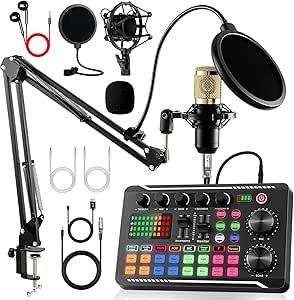
The Also GO F998 bundle is the most gear-inclusive choice here for someone who wants more than a USB mic: the package lists microphones, boom arms, headphones, shock mounts, pop filters, cables, and a mixer. Its two-channel setup and echo and noise-reduction controls give a beginner more ways to shape a live stream or a multi-participant show than the simpler FIFINE T669. That added control comes with a real learning curve, though: several components and connection options can take longer to sort out than a direct-to-computer mic. The listed connections are Bluetooth and a 3.5 mm jack, so buyers should not assume the mixer connects over USB just because USB appears in the connectivity data. I’d favor it for a creator who wants a broad accessory package and will spend time learning it, not someone seeking the simplest USB-only start.
Pros:- Bundle includes microphones, boom arms, headphones, shock mounts, pop filters, and cables.
- Two channels offer more room for multi-source recording than the single-channel FIFINE T669.
- Echo and volume controls support live adjustments while recording or streaming.
- Compatibility information lists laptops, smartphones, and gaming consoles.
Cons:- The many components and controls create a more involved setup than the FIFINE T669.
- Listed connector type is 3.5 mm, so the USB connectivity listing does not clearly establish USB audio routing.
- Durability and long-term performance details are not provided.
Best for: New streamers or podcasters who want a mixer, multiple accessories, and hands-on sound controls in one bundle.
Not ideal for: Buyers who want a minimal USB microphone setup, or who need clearly specified USB audio routing before purchase.
- Connectivity:Bluetooth, USB
- Connector:3.5 mm jack
- Channels:2
- Microphone pickup pattern:Supercardioid
- Special features:Echo control, noise reduction, volume control, battery indicator light
- Power source:Corded electric; one included lithium-ion battery required
- Compatible devices:Laptop, smartphone, speaker, voice recorder
- Dimensions:4.52 × 1.77 × 7.4 in
Our verdict“Pick the F998 if you want a feature-rich mixer bundle and can manage a more involved setup, rather than a simple USB mic.”
Movo Portable Podcast Equipment Bundle for iPhone/Android Phones – Podcast Kit with Audio Interface, 2 Dynamic Microphones, Stands, and Headphones
The Movo portable bundle is the strongest fit in this group for two people who want to record through phones or computers, rather than plug a single USB mic straight into a desk setup. It includes an audio interface and two dynamic microphones, plus stands and headphones, giving a co-hosted show a more suitable starting point than the one-channel FIFINE T669. Its XLR connection and two-channel design also make it a more conventional multi-mic arrangement than the USB-centered kits. The compromise is convenience: XLR and an interface call for more setup knowledge, and the listed 5.74 kg weight undercuts the portability implied by the name. It supports common DAW software across Windows, macOS, iOS, and Android, but I’d avoid it for a truly lightweight travel rig or an absolute plug-and-play beginner setup.
Pros:- Two dynamic microphones and two channels suit co-hosts better than the single-channel FIFINE T669.
- Audio interface, stands, and headphones provide core components for a two-person recording setup.
- Compatibility spans laptops, computers, smartphones, and tablets.
- Listed software support covers Windows, macOS, iOS, and Android.
Cons:- XLR microphones and an audio interface require more setup than a direct USB microphone.
- At 5.74 kg, the kit is heavy for a bundle positioned for portable recording.
- The listed 40 Hz–16 kHz frequency response is narrower than the FIFINE T669’s 20 Hz–20 kHz range.
Best for: Two-person podcast teams who record on phones, tablets, or computers and are comfortable connecting XLR microphones to an interface.
Not ideal for: Solo beginners wanting a single USB plug-in mic, or creators who need a lightweight kit for frequent travel.
- Connectivity:XLR
- Audio input:XLR
- Channels:2
- Microphones:2 dynamic microphones
- Frequency response:40 Hz–16 kHz
- Maximum sample rate:48 kHz
- Compatible devices:Laptop, personal computer, smartphone, tablet
- Item weight:5.74 kg
- Warranty:1 year
Our verdict“Choose Movo for a two-mic phone-compatible recording rig if the added setup and carrying weight are acceptable.”
Podcast Equipment Bundle with Microphone and Voice Changer for Streaming and Recording
This bundle makes the most sense for a streamer who values voice effects and instrument input alongside spoken-word recording. It combines USB connectivity with a USB-C output, a two-channel interface, and battery power, creating a different proposition from the plug-in-and-record FIFINE T669. The listed XLR audio input may also suit creators who want an interface-style connection rather than a single integrated USB microphone. The tradeoff is less clarity about the setup: the description mentions noise reduction and omnidirectional capture, but gives few details about controls, battery runtime, or warranty coverage. That uncertainty matters more for a first podcast kit than the extra effects may. I’d pick it for a creator who plans to experiment with sound effects and instruments, while a beginner focused on clean, simple solo recording may find the FIFINE easier to understand.
Pros:- USB-C output provides a modern connection option for compatible devices.
- Two channels and XLR audio input offer more interface-style flexibility than the one-channel FIFINE T669.
- Voice effects and instrument input can support varied live-stream content.
- Battery-powered design avoids relying solely on corded power.
Cons:- The described effects and interface may take more setup than the FIFINE T669’s direct USB approach.
- Battery runtime and charging details are not specified.
- Warranty information is limited, making long-term support harder to judge.
Best for: Streamers and podcasters who want voice-changing effects, instrument input, and a USB-C output in a battery-powered bundle.
Not ideal for: First-time solo podcasters who want clearly documented controls, power details, and a straightforward USB microphone.
- Connectivity:USB
- Output connector:USB Type-C
- Audio input:XLR
- Channels:2
- Power source:Battery powered
- Item weight:1.48 kg
- Capture and processing features:Omnidirectional capture, noise reduction, voice effects
Our verdict“Choose this bundle if voice effects and instrument input matter more than the simpler setup and clearer specifications of a basic USB mic.”
Podcast Equipment Bundle with BM-800 Microphone, Voice Changer, and Audio Interface
The BM-800 bundle gives a solo creator more streaming accessories and voice effects than the FIFINE T669, while keeping the package focused on one microphone and one channel. Its suspension arm, shock mount, pop filter, and foam cap address common desk-recording needs, and the live sound card adds voice-changing options for broadcasts. That makes it a better match for a gamer or streamer than for a podcaster who wants an uncomplicated microphone alone. USB connectivity and listed smartphone and computer compatibility are useful, but the audio input is specified as a 3.5 mm jack, so buyers should check that their intended device and connection path fit. The high stated sample rate does not replace missing detail about the sound card’s routing. Compared with the two-channel Movo kit, this is less suited to co-hosts but takes a more focused single-speaker approach.
Pros:- Suspension arm, shock mount, pop filter, and foam cap cover several practical desk-recording needs.
- Voice-changing effects add options for live streaming beyond the FIFINE T669’s basic mic setup.
- USB connectivity and listed compatibility include computers and mobile phones.
- Single-channel design keeps the kit aimed at solo recording rather than a multi-mic mixer workflow.
Cons:- One channel is not suited to recording two hosts on separate microphones like the Movo bundle.
- The 3.5 mm audio input may require buyers to check device connections before setup.
- Listed operating system support specifies Windows, leaving other platform support unclear.
Best for: Solo streamers and gaming creators who want a BM-800 mic, desk mounting accessories, and voice-changing effects.
Not ideal for: Two-person podcast teams, XLR-focused recording setups, or buyers who want a clearly documented, direct USB audio path.
- Microphone:BM-800 condenser
- Connectivity:USB
- Audio input:3.5 mm jack
- Channels:1
- Maximum sample rate:192 kHz
- Compatible devices:Laptop, personal computer, mobile phone
- Operating system:Windows
- Item weight:1.37 kg
Our verdict“Choose the BM-800 bundle for solo streaming with voice effects and desk accessories, but not for co-host recording or a clearly specified USB-only path.”
Also GO Podcast Equipment Bundle for 2 with V8s Sound Card and Voice Changer
I’d choose this bundle when a two-person show needs more than a basic USB mic: it pairs two BM-800 microphones with a V8s sound card, arms, shock mounts, pop filters, foam covers, and earphones. The included accessories make it a fuller shared recording setup than a solo kit such as the FIFINE T669, while its sound effects and voice-changing modes suit playful streams and gaming broadcasts. The tradeoff is that more pieces mean more setup and desk space, and the listing’s USB and 3.5 mm connections call for checking your device’s ports before buying. If clean, straightforward voice recording matters more than effects, a simpler USB kit is easier to manage. I’d skip this one for a compact, grab-and-go setup.
Pros:- Includes two microphones and accessories for a shared recording setup
- V8s sound card offers sound effects and voice-changing modes
- Includes microphone arms, shock mounts, pop filters, and earphones
- USB connectivity and 3.5 mm jack support a range of compatible devices
Cons:- Multiple components can make setup more involved than a single-mic USB kit
- The 16.92-inch listed dimension and accessory count call for dedicated workspace
- Voice effects may be unnecessary for straightforward podcast recording
Best for: Two-person podcast or gaming-stream hosts who want separate microphones, included desk accessories, and sound effects in one bundle
Not ideal for: Solo beginners with little desk space or buyers who want a minimal USB microphone setup without a mixer and multiple accessories
- Connectivity:USB
- Connector:3.5 mm jack
- Channels:2
- Compatible devices:Laptop, smartphone
- Special feature:Noise reduction
- Power source:Corded electric
- Weight:2.57 kg
- Enclosure materials:Metal and plastic
Our verdict“Choose this bundle for a space-ready duo show that values live sound effects more than a simple, fast-to-set-up recording chain.”
Brvomussy Podcast Equipment Bundle for 2 with Audio Interface and Voice Changer Microphones
This bundle is aimed at two-person creators who want an interface and effects for more than a computer-only workflow. It lists USB and Bluetooth connectivity, XLR microphones, and compatibility with computers and smartphones, making it a more flexible concept than the USB-and-3.5 mm Also GO bundle. Its two-mic, two-channel setup fits co-hosts, while noise reduction and voice effects can add variety to live content. The listing also describes the microphones as handheld, which may suit creators who prefer moving around rather than keeping both mics on arms. There are tradeoffs: first-use charging and driver setup may be needed, and the interface can feel involved for beginners. I’d also verify exact connection requirements before ordering, since the listed connectivity details leave some setup questions open.
Pros:- Includes two condenser microphones and an audio interface for duo content
- Lists USB and Bluetooth connectivity alongside XLR connectors
- Noise reduction and sound effects suit live streaming and gaming
- Two channels support two-person broadcasting
Cons:- Initial charging and driver setup may add steps before recording
- The interface may be complex for newcomers
- The listing provides limited detail about microphone durability and connection setup
Best for: Two-person creators who want an effects-capable interface for computer and smartphone broadcasts and are comfortable checking connection requirements
Not ideal for: First-time podcasters seeking a clearly documented, plug-in-and-record USB setup or buyers who need firm information about microphone durability
- Connectivity:Bluetooth and USB
- Connector:XLR
- Channels:2
- Polar pattern:Unidirectional
- Signal-to-noise ratio:78 dB
- Compatible devices:Audio interface, audio mixer, laptop, PC, smartphone
- Power source:Battery powered
- Enclosure material:Metal
Our verdict“Pick this for a flexible two-person streaming setup if you’re willing to confirm the connections and handle some initial configuration.”
Movo PodPro Portable Podcast Equipment Bundle for iPhone and Android Phones
For creators who want a two-person kit that can travel between a desk and a phone-based recording location, the PodPro brings together a dual-channel interface, two dynamic XLR microphones, and two pairs of headphones. Its support for Android, iOS, Windows, and macOS gives it a broader stated platform range than the desktop-focused SKTOME BM-800 bundle. Two dynamic microphones and monitoring headphones make this a more recording-oriented package than kits centered on voice effects. The tradeoff is portability: the listed weight is 5.76 kg, so the travel case doesn’t make the whole kit especially light. The listed maximum sample rate is 16 kHz, which may limit appeal for creators seeking higher-resolution capture. I’d favor it when phone compatibility and a complete two-person setup matter more than a light carry or elaborate live effects.
Pros:- Includes a dual-channel interface, two dynamic XLR microphones, and two headphone pairs
- Supports Android, iOS, Windows, and macOS
- Lists compatibility with Audacity, Adobe Audition, and GarageBand
- Includes a one-year warranty
Cons:- Listed weight of 5.76 kg makes it a substantial travel kit
- Maximum listed sample rate is 16 kHz
- Some setup familiarity may be needed to connect and configure the equipment
Best for: Two-person podcasters who record on phones as well as computers and want microphones, headphones, and a dual-channel interface together
Not ideal for: Traveling creators who need a lightweight kit or producers seeking a listed sample rate above 16 kHz
- Channels:2
- Audio input:XLR
- Frequency response:40 Hz–16 kHz
- Maximum sample rate:16 kHz
- Compatible devices:Laptop, PC, smartphone, tablet
- Operating systems:Android, Windows, iOS, macOS
- Supported software:Audacity, Adobe Audition, GarageBand
- Weight:5.76 kg
Our verdict“Choose the PodPro if you need a complete phone-compatible duo kit and can accept its weight and 16 kHz listed sample-rate ceiling.”
MAONO PD200W Hybrid Wireless Podcast Equipment Bundle for 2
The PD200W stands apart from the BM-800 bundles in this group by offering wireless, USB, and XLR connection options across two dynamic microphones. That flexibility can suit a show that moves between computer recording, compatible camera or phone setups, and an audio interface, while the listed 60 m wireless range and up-to-60-hour battery life support untethered sessions. MAONO Link software, mute, and volume controls add useful adjustment options. This is a stronger fit for adaptable recording than the Movo PodPro, whose listed setup centers on XLR microphones and a dual-channel interface. The compromises are that the listing gives a one-channel count despite describing a bundle for two, and camera or Lightning accessories may be separate. I’d verify the exact duo recording workflow and required adapters before buying.
Pros:- Offers wireless, USB, and XLR connection modes
- Bundle is described as including two dynamic microphones
- Listed wireless range is up to 60 m and battery life up to 60 hours
- Includes mute and volume controls with MAONO Link software support
Cons:- Specs list one channel despite the two-microphone bundle description
- Camera and Lightning accessories are sold separately
- Software setup or batteries may be needed for some recording workflows
Best for: Creators who want two microphones that can switch between wireless, USB, and XLR workflows across compatible devices
Not ideal for: Buyers who need a clearly specified two-channel interface or a complete camera and Lightning connection kit in the box
- Connectivity:USB, wireless, XLR
- Connector:USB Type-C and XLR; wireless
- Channels:1 listed
- Polar pattern:Unidirectional
- Signal-to-noise ratio:82 dB
- Compatible devices:Audio interface, audio mixer, camera, laptop, smartphone
- Power source:Battery powered and corded electric
- Enclosure material:Metal
Our verdict“Choose the PD200W for connection flexibility and wireless recording, but confirm how its listed channel count supports your two-person setup.”
SKTOME Podcast Equipment Bundle for 2 with V8s Voice Changer and BM-800 Microphones
The SKTOME bundle pairs two BM-800 condenser microphones with a sound card and voice effects, targeting newcomers who want a shared setup for podcasting, gaming, or singing. Its USB connectivity and plug-and-play positioning make it a more direct starting point than the Brvomussy bundle, whose description includes first-use charging and driver setup. Voice controls add entertainment options, though they’re less useful for a straightforward interview show than the Movo PodPro’s two dynamic microphones and headphone pairs. There’s also a specification mismatch to keep in mind: the product is described as a kit for two, but the listed channel count is one. The listing also notes charging after initial use, so it isn’t entirely free of power upkeep. I’d confirm how both microphones connect before treating it as a ready-made two-host rig.
Pros:- Includes two BM-800 microphones and a sound card
- USB connectivity is suited to laptop-based recording
- Voice effects and sound controls add options for gaming and streaming
- Lists a unidirectional microphone pattern
Cons:- Listed channel count is one despite the bundle being described for two
- Charging after initial use may interrupt an otherwise plug-and-play workflow
- Corded electric power limits use away from a suitable outlet
Best for: New streamers or hobby podcasters who want two microphones and voice effects in a USB-oriented bundle for a laptop or gaming setup
Not ideal for: Two-host recording buyers who require clearly specified dual-channel operation or a portable, battery-independent kit
- Connectivity:USB
- Connector:3.5 mm jack
- Channels:1 listed
- Polar pattern:Unidirectional
- Signal-to-noise ratio:78 dB
- Compatible devices:Gaming console, laptop
- Hardware platforms:Laptop, PC, smartphone
- Power source:Corded electric
Our verdict“Consider SKTOME for a USB-oriented effects bundle, but verify dual-mic channel support before buying it for a two-host podcast.”
MAONO A04 Gen2 XLR/USB Condenser Microphone Kit for PC Podcast Recording
The A04 Gen2 is the most adaptable single-mic choice here: USB makes it straightforward to start, while XLR gives you a path to use a separate audio interface later. Its pop filter, shock mount, and adjustable arm also cover more of the basic desk setup than a bare microphone kit. Compared with the USB-only MAONO AU-A04H, this one is a better fit for someone planning to change their recording chain, though the AU-A04H includes headphones. The tradeoff is that XLR use needs phantom power and the XLR cable is not included, so that upgrade takes extra gear. This is still a one-person, cardioid condenser setup, not a mixer bundle for group recording.
Pros:- USB and XLR connectivity support both simple and interface-based recording
- Includes a pop filter, shock mount, and adjustable arm stand
- 192kHz/24bit sampling specification
- Metal enclosure
Cons:- XLR cable is not included
- XLR connection requires phantom power
- Not compatible with Xbox consoles
Best for: Solo podcasters who want USB recording now and the option to move to an XLR interface later.
Not ideal for: Xbox users or beginners who want an XLR setup ready to connect without sourcing a cable and phantom power.
- Connectivity:USB, USB Type-C, XLR
- Sampling rate:192kHz/24bit
- Polar pattern:Cardioid
- Frequency response:30Hz–16kHz
- Capsule size:16mm
- Signal-to-noise ratio:70 dB
- Form factor:Studio condenser
- Enclosure material:Metal
Our verdict“Choose the A04 Gen2 if you want a complete solo USB kit with a clear upgrade route to XLR.”
Maono Podcast Equipment Bundle with Audio Mixer & 3.5mm Microphone for Streaming
This bundle is the choice for creators who want mixer controls and voice effects alongside a microphone, rather than the streamlined USB mic approach of the MAONO A04 Gen2. Its nine-channel listing and USB-C, auxiliary, and Bluetooth connections point toward a flexible streaming setup that can bring in more than one audio source. That flexibility can help with live broadcasts, but it also means more setup decisions than the plug-and-play MAONO AU-A04H. The supplied microphone does not support phantom power, so this is not the bundle to buy with plans to swap in a phantom-powered condenser. Device adapters may also be needed, and the included instructions matter more here than with a basic USB mic. I’d choose it for effects-led streaming, not the simplest path to a clean solo podcast recording.
Pros:- Includes an audio mixer, microphone, and accessories
- Offers multiple sound effects and voice modulation
- Supports USB-C, auxiliary, and Bluetooth connections
- Designed for use with PCs, smartphones, and multiple operating systems
Cons:- Setup can be more involved than with a single USB microphone
- Included microphone does not support phantom power
- Some devices may require additional adapters
Best for: Streamers and podcasters who want a mixer with voice modulation, sound effects, and connections for multiple audio sources.
Not ideal for: First-time solo podcasters seeking a minimal USB setup, or anyone planning to use a phantom-powered condenser microphone.
- Number of channels:9
- Connectivity:1/8-inch, USB Type-C, auxiliary, Bluetooth
- Audio input:Microphone, auxiliary, Bluetooth
- Output connectors:1/4-inch XLR, 3.5mm audio, USB Type-C
- Power source:Battery
- Voltage:5 volts
- Dimensions:9.44 × 5.11 × 1.65 inches
- Weight:1.3 kg
Our verdict“Pick this bundle if live sound effects and mixer connections matter more to you than a simple, direct USB recording workflow.”
MAONO AU-A04H USB Microphone Kit with Headphones for PC, Podcast & Gaming
The AU-A04H is a practical starting point for a solo host who wants headphones and mic accessories in one USB kit. The included headphones make it easier to monitor recordings without shopping for a separate pair, while the shock mount and pop filter help address handling noise and plosive bursts at the desk. Compared with the MAONO A04 Gen2, this model gives up XLR connectivity but adds headphones, making its priorities clearer: simple computer-based recording over future interface upgrades. It also lists broad compatibility, including PC, Mac, PS4, PS5, and mobile, though USB power means it still needs a powered device or suitable connection. The multiple accessories may take time to position, and its 1.5 kg listed weight makes it less convenient to carry than a compact microphone alone.
Pros:- Includes studio headphones, shock mount, and pop filter
- USB connection supports a straightforward computer setup
- Lists compatibility with PC, Mac, PS4, PS5, and mobile
- 192kHz/24bit sampling specification
Cons:- USB power limits use when a suitable power source is unavailable
- Accessory setup can take time for first-time users
- Listed weight of 1.5 kg is less suited to frequent travel
Best for: New solo podcasters recording at a computer who want headphones and core microphone accessories in one kit.
Not ideal for: Creators who need XLR connectivity, a lightweight travel setup, or a microphone that works without a USB power source.
- Connectivity:USB, USB Type-C
- Sampling rate:192kHz/24bit
- Frequency response:30Hz–16kHz
- Polar pattern:Unidirectional
- Microphone capsule:16mm
- Signal-to-noise ratio:96 dB
- Power source:USB
- Weight:1.5 kg
Our verdict“Choose the AU-A04H if you’re starting a desk-based solo podcast and want headphones included, not an XLR upgrade path.”
Movo 4-Person USB Podcast Equipment Bundle – 4 Condenser Mics, Hub & Case
When the format calls for several people at one table, the Movo bundle solves a different problem from the single-microphone MAONO A04 Gen2: it includes four condenser microphones and a USB hub for group recording. That removes the need to assemble a multi-mic kit from separate pieces, and the carrying case suits creators who record at changing locations. Four channels and real-time headphone monitoring give each participant a more direct role in the session than a solo USB mic can. The tradeoff is that it is built around a computer and USB Type-A, so newer laptops may need an adapter; optimal performance also calls for USB-C power. Its listed PC platform makes it a less flexible fit than the Maono mixer bundle for creators who want Bluetooth or smartphone-oriented inputs.
Pros:- Includes four condenser microphones and a four-port USB hub
- Supports four channels for group sessions
- Includes real-time headphone monitoring
- Carrying case helps with transport and storage
Cons:- USB Type-A connection may require an adapter for newer computers
- USB-C power input is required for optimal performance
- Listed compatibility centers on PC rather than phone-based recording
Best for: Interview hosts and small teams recording up to four people on a Mac or Windows computer.
Not ideal for: Solo creators who do not need several microphones, or mobile-first podcasters seeking a phone-focused setup.
- Connectivity:USB
- Connector type:USB Type-A
- Number of channels:4
- Polar pattern:Unidirectional
- Form factor:Mini
- Power source:Corded electric
- Compatible devices:Laptop, personal computer
- Warranty:1 year
Our verdict“Choose the Movo bundle when four people need separate USB microphones in one portable kit.”
MAONO A04 USB Microphone, 192kHz/24Bit Condenser Mic Kit for PC Podcast
The MAONO A04 is a focused USB-only kit for solo desk recording, with a cardioid microphone plus a pop filter, shock mount, and boom arm. Those included pieces help position the mic and reduce plosive and vibration distractions without adding an XLR interface to the setup. Compared with the dual-connection MAONO A04 Gen2, this model has fewer upgrade options, but its simple USB approach suits creators who expect to stay with direct computer recording. The AU-A04H is the better fit if you also want headphones in the box; this A04 instead centers the kit on mounting and mic placement. Its 70 dB signal-to-noise specification and 30Hz–16kHz range are useful reference points, but it remains a single-channel microphone, not a multi-person recording solution.
Pros:- Includes a pop filter, shock mount, and boom arm
- USB plug-and-play connectivity
- Cardioid pattern focuses capture toward the speaker
- Metal enclosure
Cons:- USB-only connection does not offer an XLR upgrade path
- Not compatible with Xbox consoles
- The listed kit does not include headphones
Best for: Solo podcasters who want a USB microphone with a boom arm, shock mount, and pop filter for a fixed desk setup.
Not ideal for: Hosts recording multiple people, Xbox users, or buyers who want headphones or XLR connectivity included.
- Connectivity:USB, USB Type-C
- Sampling rate:192kHz/24bit
- Polar pattern:Cardioid
- Frequency range:30Hz–16kHz
- Microphone capsule:16mm
- Signal-to-noise ratio:70 dB
- Power source:USB
- Item weight:1.35 kg
Our verdict“Pick this A04 for a straightforward solo USB desk setup with mounting accessories, and choose the AU-A04H if included headphones are a priority.”

How We Picked
I compared these kits by how well their included equipment matches common podcast setups: solo recording at a computer, recording with a co-host, using a phone, and hosting a group. I looked at the microphone and connection type, number of included mics, presence of headphones or stands, portability, and whether a mixer or sound card adds practical control or extra setup work. Compatibility matters especially for USB and mobile kits, so the ranking favors clear use cases over feature counts alone.
The order reflects the balance between ease of getting started and usefulness for the intended buyer. Focused USB microphone kits rank well for solo beginners because they avoid unnecessary routing, while multi-mic, wireless, and mixer bundles rise for buyers who need those specific capabilities. I treat bundle contents as a fit question, not proof of better sound: buyers should confirm device connections, microphone count, and recording workflow before choosing.
| podcast starter kit usb | Power source |
|---|---|
| FIFINE T669 Studio Condenser U | Corded electric |
| Also GO Podcast Equipment Bund | Corded electric; one included lithium-ion battery required |
| Movo Portable Podcast Equipmen | — |
| Podcast Equipment Bundle with | Battery powered |
| Podcast Equipment Bundle with | — |
| Also GO Podcast Equipment Bund | Corded electric |
| Brvomussy Podcast Equipment Bu | Battery powered |
| Movo PodPro Portable Podcast E | — |
| MAONO PD200W Hybrid Wireless P | Battery powered and corded electric |
| SKTOME Podcast Equipment Bundl | Corded electric |
| MAONO A04 Gen2 XLR/USB Condens | — |
| Maono Podcast Equipment Bundle | Battery |
| MAONO AU-A04H USB Microphone K | USB |
| Movo 4-Person USB Podcast Equi | Corded electric |
| MAONO A04 USB Microphone | USB |
Factors to Consider When Choosing Podcast Starter Kit Usb
Before choosing a kit, decide what you will record and where. A compact computer setup, a phone-based interview, and a four-person roundtable place different demands on microphones, connections, and room layout. These factors can help prevent paying for controls you will not use or buying a bundle that cannot connect to your intended device.
Match the Kit to Your Recording Device
Start with the computer, phone, or tablet you plan to record on, then verify the kit’s connection path for that exact device. A USB microphone may be simple on a computer but less direct on a phone, where adapters, app support, or power needs can affect setup. Mobile-focused bundles make sense for on-the-go recording, but their portability matters less if you always work at a desk. Do not assume that a USB plug guarantees compatibility with every phone or recording app. Check whether the bundle uses USB, 3.5 mm, an audio interface, or a mixer, and identify any required adapters before buying. This small check can prevent a kit with plenty of gear from becoming an awkward fit.
Choose the Microphone Count Before the Extras
Count the people who will speak into microphones at the same time, not everyone who might appear on the show eventually. A two-mic kit can simplify a regular co-host setup, while a four-mic bundle is more appropriate for roundtables or in-person interviews. Buying extra microphones adds placement, cable, and input-management work, so it can make a small room harder to organize. Conversely, sharing one mic between speakers can create inconsistent volume and awkward positioning. If guests usually join remotely, a solo USB mic may be more practical than a multi-mic bundle. Leave room to expand only if the kit’s connections and recording workflow support it.
Decide Whether You Need a Mixer or Sound Card
A mixer or sound card can provide hands-on level controls and live effects, which may help streamers or hosts who want to adjust audio while recording. It also adds another device, more settings, and a potential source of connection confusion. For a beginner recording a single voice into a computer, a direct USB microphone often keeps the signal path easier to understand. Effects such as voice changing can be fun for live content, but they are not a substitute for clear speech or controlled room noise. Think about whether you need to monitor and change audio live, or whether simple recording and editing afterward will do. Choose the mixer bundle for a real workflow need, not just because it lists more functions.
Plan for Room Noise and Microphone Placement
Kit contents cannot fix a noisy or echo-prone room by themselves. A microphone placed close to the speaker, away from computer fans and reflective walls, can matter more than adding another accessory. Stands and mounts help keep placement stable, while headphones can help catch monitoring problems during a session. Condenser microphones can suit controlled indoor recording, but a loud room may call for a different microphone approach and better sound treatment. Before choosing a bundle, consider desk space, mic-arm clearance, and how close each speaker can sit to a mic. A small amount of room preparation can make a basic kit more useful than a larger bundle in a poor recording space.
Separate Portability From Long-Term Expandability
Portable kits are attractive if you record in different locations, interview guests away from your desk, or need a compact way to pack equipment. Yet portability and expandability are not the same thing: a mobile-focused setup may be convenient today but less suited to a growing multi-host show. A fixed desktop USB microphone is easier to leave connected, while a bundle with an interface or mixer may offer more ways to route several sources. Think about whether your show’s format is likely to change, and check how the kit handles added microphones or different devices. Avoid buying for a hypothetical future studio if your immediate setup is simple. Equally, do not choose a compact kit if your recurring sessions already require several speakers.
Compare the Useful Contents, Not the Bundle Size
Long accessory lists can obscure whether the kit includes what your workflow actually needs. For a solo host, a suitable microphone and stable stand may be more helpful than a sound card with controls that will go untouched. For two or more speakers, count microphones and check whether the included mixer or interface supports the intended arrangement. Headphones help with monitoring, but the presence of headphones does not answer questions about connection compatibility or recording quality. Review the included cables, stands, adapters, and power requirements as a complete setup rather than isolated extras. A smaller, focused kit can be the better starter choice when it removes setup friction.
Frequently Asked Questions
Can I use a USB podcast kit with my phone?
Some kits are designed with phone recording in mind, while others are primarily intended for a computer. Check the connection type and confirm that your phone and recording app support it; a USB connector alone does not guarantee compatibility. You may need an adapter, and some setups can have power or monitoring limitations on mobile devices. Phone-oriented Movo bundles are a natural place to start comparing, but confirm the exact phone connection before purchase. If you plan to record on both phone and computer, favor a kit with a connection path that clearly supports both.
Should I choose a USB microphone or a mixer bundle for my first podcast?
For a solo show recorded on a computer, a direct USB microphone is usually the simpler starting point because it reduces the number of devices and settings. A mixer bundle makes more sense when you need several microphones, hands-on controls, or live effects while streaming. Extra controls can help, but they also add setup steps and can complicate troubleshooting. Think through one typical recording session before deciding: count speakers, list the devices you need to connect, and decide whether you will adjust sound live. Choose the smaller signal path if the added controls do not solve a specific problem.
Is a two-person kit worth choosing if I sometimes record alone?
A two-person kit can be a good fit when co-host episodes are a regular part of the show, since each speaker can have a dedicated microphone. For occasional solo episodes, it may leave you managing equipment you do not need that day. Check whether the kit can operate cleanly with one mic and whether its interface or mixer suits both formats. If most sessions are solo and guest appearances are remote, a single USB microphone may keep the setup simpler. Make the choice based on your usual episode format, not a rare recording plan.
Do voice-changing features improve a podcast recording?
Voice-changing effects can add a live entertainment element, particularly for streaming or formats built around character voices. They do not automatically improve speech clarity, reduce room noise, or make a recording sound more polished. Effects can also distract from conversation if they are used without a clear creative purpose. If your priority is a clean interview or spoken-word episode, focus on microphone placement, monitoring, and an easy recording path first. Consider a voice-changer bundle only when live effects are part of the show you intend to make.
What should I check before buying a kit for four or more speakers?
Confirm that the kit includes enough microphones and that its hub, mixer, or interface can connect and manage them at the same time. Check the included stands and cables, then consider whether your recording space can fit each speaker at a useful distance from a microphone. Ask how the system connects to your computer and whether your recording software can handle the intended inputs. A bundle with several mics is not automatically a complete group-recording workflow. If some participants will join remotely, a smaller local setup paired with remote recording may be easier to manage.
Conclusion
For most first-time solo hosts recording at a computer, I would start with the FIFINE T669 as the best overall choice because it keeps the setup focused. The MAONO A04 USB Microphone Kit and AU-A04H are strong value-minded alternatives for buyers who want a computer-oriented mic kit, while the MAONO PD200W is my premium-style pick for a two-person setup that benefits from wireless flexibility. Beginners who want fewer routing decisions should favor a direct USB microphone over a mixer and voice-changer bundle. For phone recording, compare the portable Movo kits; for a larger in-person show, consider the four-person Movo bundle. The right choice is the one that matches your speaker count and recording device without adding controls you do not plan to use.
Halloween Picks

10.5 ft Lighted Pumpkin and Ghost Halloween Inflatable Archway

JOYIN 5-Foot Halloween Animatronic Drinking Skeleton

11.2-Foot Halloween Inflatable Pumpkin with LED Lights
As an affiliate, we earn on qualifying purchases.