
TL;DR
Moving your rig into a closet can drastically cut noise and reflections. Proper placement of acoustic materials and ventilation turns a noisy closet into a quiet, professional-sounding space. The key is balancing sound absorption with effective heat management.
Imagine your tiny closet transformed into a quiet sanctuary for voice-over recordings or streaming. No more echo, no more background noise. The secret isn’t just fancy foam; it’s about where you put your mic, what you put around it, and how you handle heat. This guide will show you how to turn that cramped space into a sound-friendly zone that works for your voice and your equipment.
Forget the myth that foam alone makes a space soundproof. Your best move is to control reflections and put distance between your mic and noise sources. Whether you’re recording podcasts or running a high-powered AI rig, understanding placement and ventilation makes the difference between a muffled mess and professional clarity.
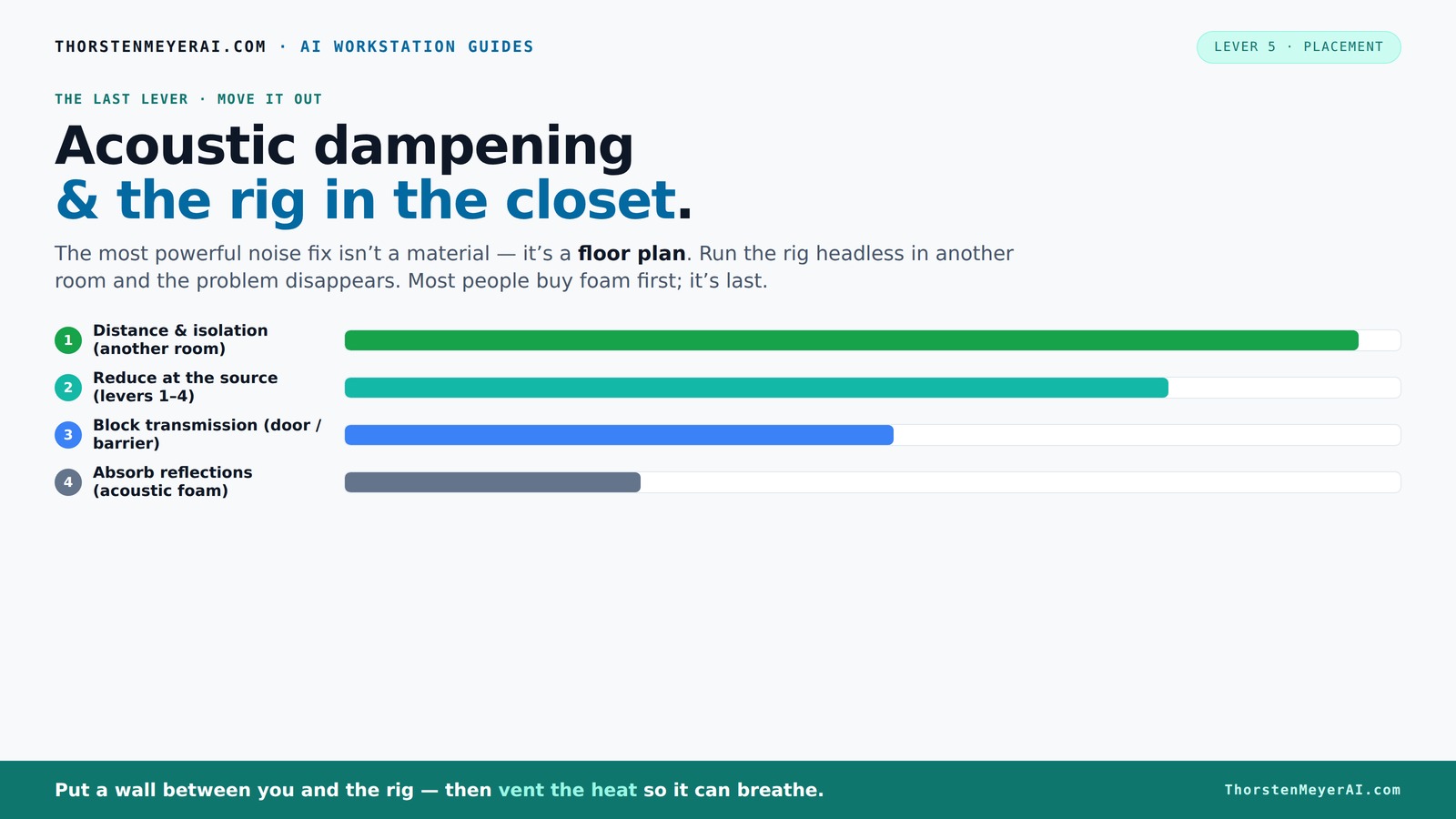
Acoustic dampening
& the rig in the closet.
The most powerful noise fix isn’t a material — it’s a floor plan. A rig you can’t hear because it’s in another room beats any amount of foam. Tap the approaches in Part 1 to see what actually works.
(another room)
(levers 1–4)
(door / barrier)
(acoustic foam)
Contain the noise, not the heat
Key Takeaways
- Moving your rig into another room or closet is the most effective noise reduction method.
- Proper ventilation is essential when placing a computer in a sealed closet to prevent overheating.
- Focus on placement of acoustic materials—behind the mic and at reflection points—for the best sound quality.
- Sealing gaps around doors and outlets cuts down on sound leakage significantly.
- Address low-frequency issues with bass traps in closet corners for a cleaner overall sound.
soundproof closet acoustic treatment
As an affiliate, we earn on qualifying purchases.
As an affiliate, we earn on qualifying purchases.
Why Moving Your Rig Is Often the Best Sound Solution
The simplest way to cut noise is to put your rig far away from your ears. Think of it like a loud neighbor — if you can’t hear them, it’s not bothering you. For an AI workstation or gaming PC, placing it in another room or even a closet means you don’t need to fight noise with foam.
Many creators and professionals use this trick. They run a long Ethernet cable, set up a headless machine, and control everything remotely. This method is effective because it addresses the problem at its source—eliminating the need for soundproofing materials that only absorb sound within the space. However, it also means you sacrifice immediate accessibility and may face latency issues depending on your setup. The tradeoff is worth it if your main priority is noise reduction and clarity in your recordings or streams.
As an affiliate, we earn on qualifying purchases.
The 'Rig in the Closet' Setup — How to Do It Without Cooking Your Hardware
Placing a heat-generating machine in a closet can seem ideal for noise control, but the main concern is heat buildup. Excess heat can lead to thermal throttling, reducing performance, or even hardware failure over time. Understanding the implications of poor ventilation is crucial because it directly affects your equipment’s longevity and stability. The key is to design a setup that balances soundproofing with efficient airflow.
Installing passive vents or exhaust fans creates a continuous flow of fresh air, preventing heat from accumulating. Using ducted fans or purpose-built soundproof cabinets that incorporate insulation with cooling solutions can maintain low temperatures without sacrificing quiet operation. For example, a small, ventilated closet with a quiet exhaust fan not only keeps the system cool but also prevents heat from escaping into the rest of your space, which could cause noise disturbances or heat damage. Remember, neglecting heat management can turn your quiet closet into a thermal nightmare, negating the benefits of soundproofing.
acoustic foam panels for recording
As an affiliate, we earn on qualifying purchases.
As an affiliate, we earn on qualifying purchases.
How to Reduce Reflections Inside Your Closet for Better Sound
Acoustic dampening isn’t just about stuffing foam randomly; it’s about understanding how sound interacts with your space. Reflections occur when sound waves bounce off hard surfaces, creating echoes and harshness that muddy your recordings. Addressing these reflections at their source improves clarity and reduces the need for excessive damping materials.
By treating the wall behind your mic, you prevent direct reflections from bouncing straight back into the microphone capsule, which can cause comb filtering and phase issues. Adding foam or blankets on side walls and the ceiling reduces flutter echo and harsh reverberations that make your voice sound unnatural or distant. Using a thick rug on the floor absorbs reflections from hard surfaces, preventing a muddy sound. Recognizing these reflection points and treating them effectively means you’re designing a space where sound is controlled proactively, not just masked with more foam. This approach results in cleaner recordings and less post-processing, saving time and effort.
ventilation fan for soundproof room
As an affiliate, we earn on qualifying purchases.
As an affiliate, we earn on qualifying purchases.
Frequently Asked Questions
Will acoustic foam soundproof my closet completely?
Not really. Foam mainly reduces echo and reflections within the space. To stop sound from escaping, sealing gaps and using barriers are necessary steps.How do I prevent my closet rig from overheating?
Install passive vents or exhaust fans to keep air flowing. Consider a purpose-built soundproof cabinet with temperature control if heat buildup is a concern.Where should I place treatment materials for the best results?
Start behind the mic, then add panels on side walls, ceiling, and the desk surface. Focus on early reflection points for maximum effect. Proper placement ensures that sound waves are absorbed or deflected before they create echoes, which is critical in small, reflective spaces.Do I need bass traps in a closet setup?
If you notice low-end boominess or uneven bass response, adding bass traps in corners can significantly improve sound clarity. They help dampen standing waves and resonances that are often exaggerated in small, enclosed spaces.Can I use my closet for both recording and high-power computing?
Yes, but ensure proper ventilation. Use ducted fans or a cooling system designed for small enclosed spaces to prevent overheating while keeping noise down. Balancing heat dissipation with noise control is crucial for maintaining hardware performance and a quiet environment.Conclusion
Your closet can become a quiet, professional-quality recording space or a silent AI workstation with the right approach. The biggest wins come from controlling reflections and managing heat, not just adding foam.
Think of your space like a smart puzzle—by placing materials correctly and venting properly, you turn a noisy closet into an asset. The next time someone asks about soundproofing, remember: distance and placement are your best tools.